
Install
Inside DeepSeek Harness, with dsh-market
dsh plugin --profile web add dshmarket
Or from the command line
dsh plugin --profile web add dsh-opencode-go
Installing runs third-party code with your own permissions — it can read your files, use your credentials and reach the network. Review the source first, and pin a commit (github:owner/repo#sha) when you can.
README
Use OpenCode Go subscription models in DeepSeek Harness, with streaming replies, tool calls, and image input.
The plugin automatically adds the session headers required by OpenCode Go, reads the gateway model catalog, and displays subscription usage. There is no need to configure model protocols, modalities, context windows, or maximum output tokens manually.
Features
- Session headers: Every request includes the Harness User-Agent and
x-opencode-session. A session keeps a stable ID to support gateway routing and prompt-cache optimization; actual cache hits depend on the upstream service. - Streaming and history: Supports streaming output, tool calls, and history replay through pi-ai.
- Image input: Supports models that advertise image capability in the catalog.
- Model capacity overrides: Override the context window and maximum output per model, with blank values inheriting the online catalog.
- Per-model switches: Control which models appear in conversations, with changes applied immediately. Ordinary models default to on and deprecated models default to off; any model can be enabled individually.
- Prompt and caching: The plugin does not add hidden system prompts; the session ID is used for gateway routing.
Installation and usage
Supports DSH 0.1.5-rc.1 and later, including alpha, rc, and stable releases. Compatibility will be maintained as new host versions are released.
Verified versions: 0.1.5-rc.1, 0.1.5-rc.2, 0.1.6-alpha.1, 0.1.6-alpha.2, 0.1.7-alpha.1, 0.1.7-alpha.2, 0.1.7-rc.1, 0.1.7-rc.2, and 0.2.0-rc.2.
Install from DSH (recommended)
- Open the Plugins page in DSH and click Add plugin in the top-right corner.
- Enter
dsh-opencode-goand click Install. - If prompted after installation, click Enable now.
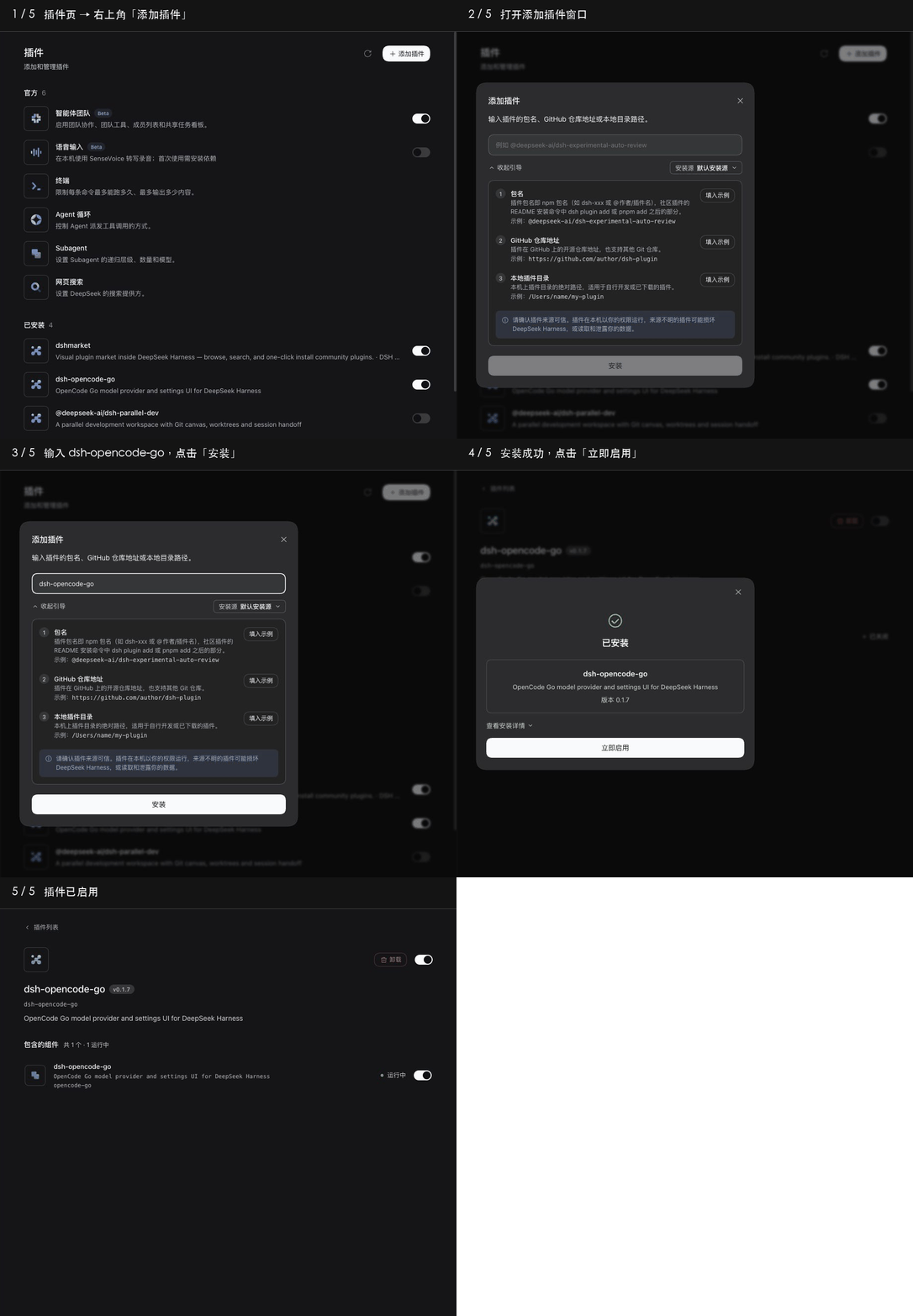
Then open Settings → OpenCode Go, enter and save your API key, and select an OpenCode Go model in a conversation.
The plugin can also be installed by entering this Git repository URL:
https://github.com/Duskriver/dsh-opencode-go
The current default branch includes the compiled plugin. Installation needs neither a local build nor a plugin-specific allowBuilds entry. URLs pinned to older commits retain those commits' installation behavior; update them to the current branch.
If your DSH version does not have an Add plugin entry, use the command-line method below.
Command-line installation (alternative)
dsh plugin --profile web add dsh-opencode-go
Start or restart dsh web, then:
- Open Settings → OpenCode Go.
- Enter and save your OpenCode Go API key.
- Select an OpenCode Go model from the conversation model picker.
Headless
Install the plugin into the Headless profile:
dsh plugin --profile headless add dsh-opencode-go
Save the following as headless.patch.yml to select a default model:
- id: agent-default-model
  config:
    provider: dsh-opencode-go
    model: deepseek-v4.1-flash
Read the API key in Bash or Zsh, then run a task:
read -s OPENCODE_API_KEY
export OPENCODE_API_KEY
dsh --profile headless --patch ./headless.patch.yml "Hello"
The model ID must be available in the current gateway catalog. Web and Headless use separate profiles, so install the plugin in each profile you use.
To build from source and install a local package:
npm ci
npm run compile
npm pack
dsh plugin --profile web add ./dsh-opencode-go-0.1.19.tgz
Source development builds the plugin explicitly with npm run compile; --legacy-peer-deps is not required. Multi-version DSH compatibility tests use independent environments and are not installed during ordinary installation or builds. For Headless, replace web with headless.
Development and verification
npm run compile       # Regenerate lib/ and commit it with source changes
npm test              # Core tests, rebuilding the plugin first
npm run check:dist    # Verify shipped artifacts match the source
npm run test:compat   # One tarball tested in 8 independent DSH environments
npm run test:install  # npm / pnpm Git installs without plugin build approval
npm run verify        # All of the above
Compatibility and installation checks download dependencies, use system temporary directories, and clean up afterward. To check one host, run npm run test:compat -- v017-rc2. See the development guide for maintaining host versions.
Updating the plugin
Update the plugin in the Web profile to the latest npm version:
dsh plugin --profile web update dsh-opencode-go --latest
Restart dsh web and refresh the browser afterwards. For Headless, replace web with headless; if both profiles have the plugin installed, update each one separately.
Subscription usage display
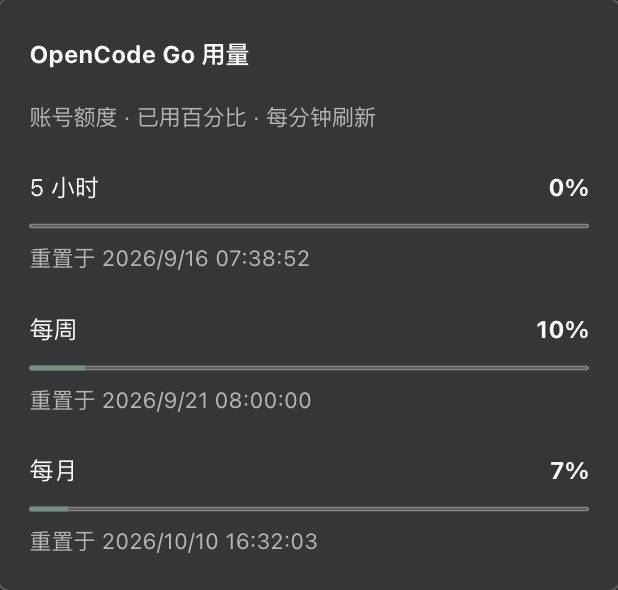
Under Settings → OpenCode Go → Advanced settings → Usage display, choose a mode and save: Auto (default) shows the pill only for this plugin's DSH OpenCode Go models; Always keeps it visible with other models, including the built-in opencode-go provider; Off hides it and stops polling. Disabling OpenCode Go hides the pill in every mode. Click the pill to open the usage panel.
Usage refreshes every minute. Temporary network or service errors retain the last reading for the same account, with a failure notice, timestamp, and reason; the usage panel offers an immediate retry. Initial and authentication failures do not show old usage. Catalog, metadata, and usage JSON requests retry a transient connection reset once within the original timeout budget; this cannot guarantee recovery while the network is failing.
Interface language
The plugin follows Harness and supplies Chinese and English copy without storing a separate language preference. With no explicit choice, the Web client matches the browser's preferred languages (usually inherited from the system); native shells with a system-language bridge supply their operating-system languages. English is used when no supported language matches.
A language explicitly selected in Harness takes precedence and updates the plugin immediately without discarding form drafts. Model names and IDs stay unchanged; usage dates and capacity numbers follow the active interface language. Automatic language detection runs at startup: reload the Web page after changing browser languages, or restart desktop Harness after changing system languages.
Model switches
In Settings → OpenCode Go, the switch beside each model controls whether it appears in conversation model pickers. Switch changes are saved immediately; capacity and API key edits still require Save. Ordinary models default to on and deprecated models default to off. You can enable a deprecated model individually or disable an ordinary model. Newly discovered models follow the same defaults unless configured individually.
For manual configuration, add modelVisibility under the plugin's config, replacing the example placeholders with actual model IDs:
modelVisibility:
  your-model-id: false
  your-deprecated-model-id: true
Only the listed IDs receive explicit overrides. Switches affect model pickers only: existing conversations can still call hidden models served by the gateway, and Settings retains the complete model list.
The older showDeprecatedModels and visibleModelIds fields no longer control visibility. Use the individual switches or modelVisibility; retaining old fields does not prevent the plugin from loading.
Image count cap
Under Settings → OpenCode Go → Advanced settings, set maxImages to a positive integer and save; no restart is needed. It is unset by default, with no image-count cap. Clearing or resetting removes the user override and inherits the base configuration; if the base has no cap either, the count is unlimited.
The count covers the full history sent in one request, including tool-result images. Repeated occurrences of the same attachment count separately. With a cap of 30, 30 images pass through; 31 images cause the oldest occurrence to be offloaded before the request continues. Offloading replaces image content with a text placeholder and keeps the original attachment, but the model cannot see the offloaded image content in that request.
DSH 0.1.5 offloads only for the current request. DSH 0.1.6 and later record offloaded occurrences and retry through the host's image-offload mechanism; raising or clearing the cap does not automatically restore images already offloaded from history. Existing payload, pixel, and per-image byte budgets still apply independently and may require more images to be offloaded. This optional compatibility setting does not change upstream service limits.
FAQ
Coexistence with the host's OpenCode Go and upgrade migration
Version 0.1.17 and later use the independent dsh-opencode-go provider, shown as DSH OpenCode Go in the model picker. The host pi-ai's opencode-go provider can run alongside it. Configure the API key in this plugin's settings, then choose a model under DSH OpenCode Go. Versions 0.1.16 and earlier use opencode-go; their headless configuration should also use that older identity.
Sessions, Agent presets and headless defaults previously saved with provider: opencode-go need to select DSH OpenCode Go again, or change the provider to dsh-opencode-go. API keys, model settings and metadata caches are retained. Existing session content remains available; when switching providers, DSH removes the previous adapter's private replay metadata according to its ownership rules.
An expected model is missing
Check that the model's switch is on in Settings → OpenCode Go. Deprecated models default to off; turning on an individual model makes it available in conversation pickers without another global option.
Confirm that the plugin is enabled and an API key is configured, then refresh the model list in Settings. Settings reads and refreshes request the gateway's /models endpoint and synchronize the OpenCode Go configuration from models.dev. Conversation pickers respect the catalog cache lifetime, so model switch changes do not force another gateway request. Protocol support, context length, output limit, and image capability come from the online configuration, so new models do not require a release of this plugin or pi-ai.
Models that are present in the gateway and have an entry using Anthropic Messages, OpenAI Chat Completions, or OpenAI Responses are discovered on the next Settings refresh or after the catalog cache expires. A Settings refresh bypasses the cache and notifies open conversation pickers to use the same updated catalog; a direct request for a previously unseen model also triggers an immediate resynchronization. The Settings page shows the complete discovery result.
A gateway model ID with no usable protocol or capability configuration is marked “Configuration missing” in Settings, with its switch off and disabled, and is kept out of the conversation picker, so one unconfigured model cannot block the rest of the list. Direct requests report the reason. Refresh after the upstream configuration is corrected. A model ID alone is not enough to reliably infer its transport; new protocols or protocol-specific exceptions may still require adapter changes.
If online configuration cannot be loaded, models without usable cached or built-in configuration are marked “Configuration unavailable”, with the configuration source error shown on the page. Check access to https://models.dev/api.json from the machine running DSH and review the error details, then refresh. When retrying a retained model list, its previous failure stays visible until a successful refresh clears it; configured models remain usable.
A reasoning-capable model without adjustable reasoning levels (for example, union-alpha) remains selectable and usable; it simply has no reasoning-strength control.
MiMo V2.6 Flash's gateway catalog does not yet list its controls. Based on direct OpenCode Go probes, the plugin offers Off / Low / Medium / High: Default omits reasoning_effort and preserves gateway-default reasoning; Off sends none, and the other levels send their matching values. This rule applies only to the verified model and protocol, not other MiMo models. Low / Medium / High were accepted and returned reasoning content, but are not guaranteed to produce increasing amounts of reasoning.
Online effort declarations determine selectable strengths. Toggle or budget declarations produce controls only for established native switch or budget protocols; they do not imply off or high effort parameters on a generic OpenAI-compatible route. An explicit empty control list does not gain an Off choice just because the model can reason.
A model that does offer adjustable levels also declares a default effort (high when the model offers it, otherwise the highest level it offers) whenever its transport would answer an unset effort with an explicit disable (deepseek, zai, qwen, qwen-chat-template). DSH uses that default when no level has been chosen, so leaving the control unset still sends a reasoning level instead of turning thinking off. Transports that leave the choice to the provider declare no default and are unchanged, and an explicitly chosen level always wins.
If the online configuration is temporarily unavailable, the plugin prefers previously fetched configuration, including disk data from before a restart, and falls back to pi-ai's built-in metadata. If a gateway catalog refresh fails, ongoing requests and Settings retain the last successful list from the current process. A failure from either source shows a warning, its cause, and the last successful checks of the model listing and model configuration separately. An initial gateway failure never invents a model list from cached metadata.
Model configuration is saved to $DSH_HOME/cache/dsh-opencode-go/models.dev.api.json, or ~/.dsh/cache/dsh-opencode-go/models.dev.api.json when DSH_HOME is unset. This contains only public metadata, its ETag, and the last successful check time; it excludes API keys and gateway listings. After a restart, ordinary reads verify the gateway listing and use disk configuration while revalidating metadata in the background. The completed refresh updates conversation pickers. Corrupt caches fall back to the network, and write failures do not discard online results. Settings refreshes always wait for online verification, retaining old configuration with a diagnostic on failure; a disk hit is not reported as an online success. To clear the disk cache, exit DSH and delete this file.
refreshMinutes controls the cache lifetime after a successful refresh. Failed refreshes become eligible for retry on the next read after 5, 10, 20, 40, then at most 60 seconds; there is no background polling when nothing reads the catalog. Explicit Settings refreshes and previously unknown model requests bypass this delay. Cancelling model resolution or generation immediately ends that caller's catalog wait while other callers can continue sharing the same refresh.
Verified model configurations can serve generation immediately for five minutes after their cache lifetime expires, while triggering one shared background refresh. This window is measured from each source's last successful check; failed retries do not extend it. Beyond that window, requests wait for the next due refresh, retaining the existing fallback behavior if it fails. Initial loads without a disk cache, unknown models, and manual refreshes wait for online results. Listing requests have a 10-second deadline; the larger model metadata download has its own 30-second deadline and negotiates gzip to reduce transfer size on slow connections. If an HTTP/2 host compatibility issue delivers raw gzip bytes, the plugin asynchronously decompresses them within the same deadline, limiting both the delivered bytes and decoded result to 16 MiB. Model listing and usage requests continue to use uncompressed transfer.
Continuation, retries, and restored sessions reuse the Host's durable session ID. Forks and subagent sessions use their own IDs, separate from the parent. Standalone requests without a session ID receive a fresh random identifier each time.
Uninstall
Remove the plugin from the relevant profile and restart the application:
dsh plugin --profile web remove dsh-opencode-go
# or
dsh plugin --profile headless remove dsh-opencode-go
Feedback
Please open an issue for bugs or feature requests.
License
Comments
Comments live in GitHub Discussions. Sign in with GitHub to post or react.