
Install
Inside DeepSeek Harness, with dsh-market
dsh plugin --profile web add dshmarket
Or from the command line
dsh plugin --profile web add @opendsh/dsh-plugin-setting-mcp
Installing runs third-party code with your own permissions — it can read your files, use your credentials and reach the network. Review the source first, and pin a commit (github:owner/repo#sha) when you can.
README
English | 中文
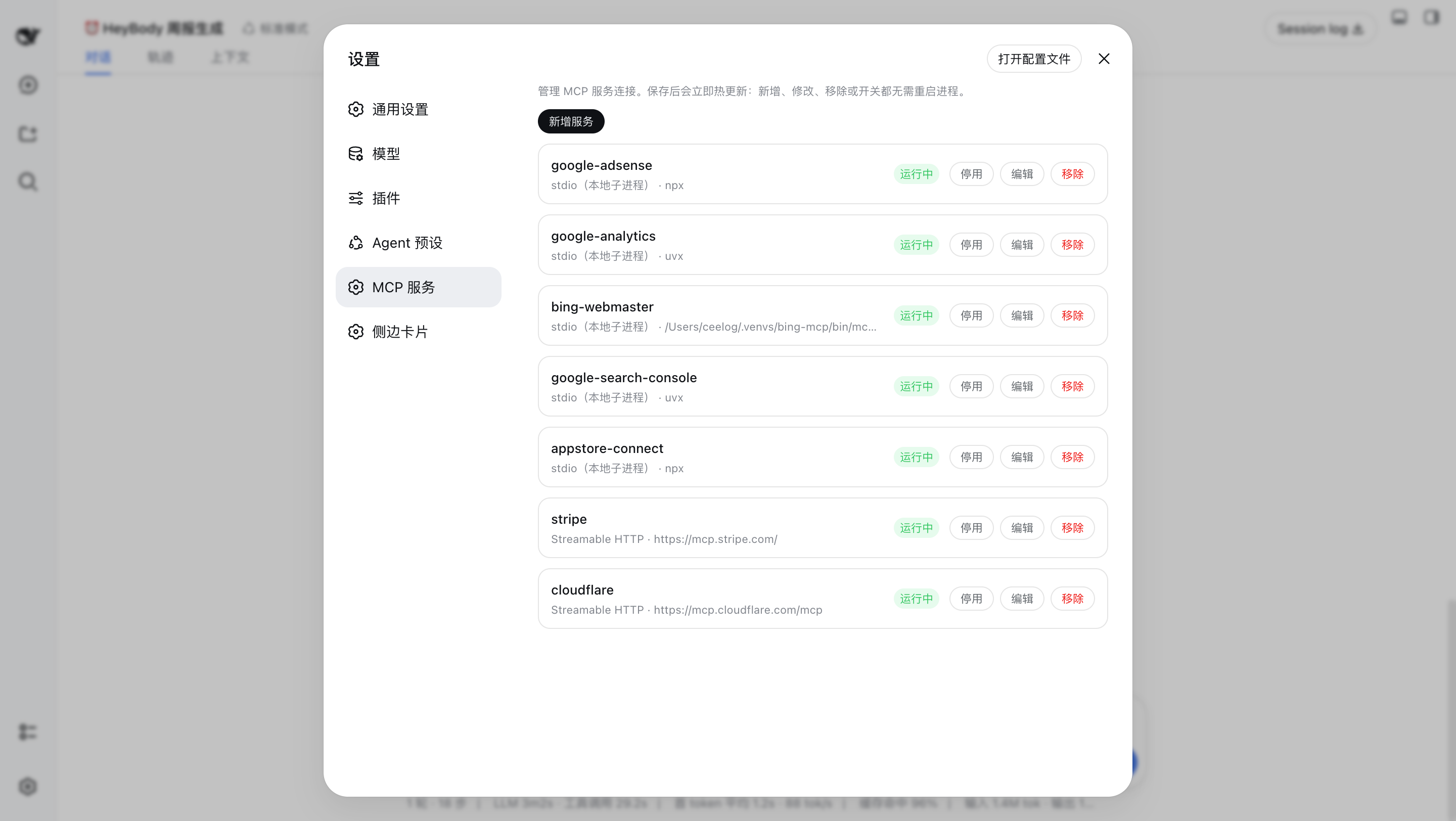
DSH web plugin: manage MCP servers from the settings panel. View, edit, remove,
enable, and disable MCP servers, then Save — the change hot-reloads immediately
(no process restart), because each server is a live @deepseek-ai/dsh-mcp-client
loader entry.
What it does
- View — lists every configured MCP server with its
serverName, transport (stdio / Streamable HTTP), command or URL, and live state (enabled / disabled, plus the connection phase:active,failed,loading, …). - Add / Edit — full editor for a server:
serverName, transport,commandargs+cwd+env(stdio), orurl+headers(HTTP), plus the per-call timeout and thefailOnStartupErrorflag.
- Remove — deletes the server's loader entry (with a confirm prompt).
- Enable / Disable — toggles the entry's
disabledflag without touching its config, so a disabled server keeps its full configuration. - Save → hot reload — edits are staged locally; Save reconciles the
loader tree (
create/update/remove), then writes the server set back to the profile'scordis.patch.yml(the durable patch layer). Each operation restarts only the affecteddsh-mcp-clientinstance, which is the same hot-swap the harness HMR performs.
Architecture
A dual-face npm package installed into the web profile:
| Half | Entry | Role |
|---|---|---|
| Server | lib/index.js |
Cordis plugin (inject: ["loader"]): mounts the ctx.mcp typert service that projects and reconciles the loader's @deepseek-ai/dsh-mcp-client entries. |
| Protocol | lib/typert.js |
Host TYPERT face (mcp/list, mcp/save), auto-registered by dsh-typert-loader. |
| Browser | lib/client.js |
React page mounted into the settings.section slot; calls the host through the installed remote.mcp namespace. |
The client↔server channel is the DSH typert protocol: strict zod codecs validate every argument and result on both sides.
Install
dsh plugin --profile web add @opendsh/dsh-plugin-setting-mcp
How it maps to cordis.patch.yml
The plugin manages the dsh-mcp-client rows in the profile's cordis.patch.yml
(the user patch layer — not cordis.yml, which the launcher resets to an
empty list on every boot). A stdio server is the same as:
# cordis.patch.yml
- insert:
    - id: mcp-github
      name: "@deepseek-ai/dsh-mcp-client"
      config:
        serverName: github
        transport: stdio
        command: npx
        args: ["-y", "@modelcontextprotocol/server-github"]
        env:
          GITHUB_TOKEN: ...
and a Streamable HTTP server is the same as:
# cordis.patch.yml
- insert:
    - id: mcp-web
      name: "@deepseek-ai/dsh-mcp-client"
      config:
        serverName: web
        transport: streamable-http
        url: http://localhost:3000/mcp
        headers:
          Authorization: ...
The tool names the model sees stay server-qualified (mcp__<serverName>__<tool>),
exactly as with hand-written entries.
Development
pnpm install
pnpm --filter @opendsh/dsh-plugin-setting-mcp build
pnpm --filter @opendsh/dsh-plugin-setting-mcp test
Known limitations
reconnectis not surfaced by the editor. A disabled/enabled toggle and edits to other servers keep the storedreconnectblock; the editor itself cannot view or change it.- Advanced
reconnectfields and future MCP capabilities (resources, prompts) are out of scope for this panel; they remain configurable directly incordis.patch.yml. - Save is a reconcile, not a transaction. Operations apply sequentially; if a later entry fails (e.g. the server process can't start), earlier operations are already applied and the failure is reported in the panel.
Comments
Comments live in GitHub Discussions. Sign in with GitHub to post or react.