
Install
Inside DeepSeek Harness, with dsh-market
dsh plugin --profile web add dshmarket
Or from the command line
dsh plugin --profile web add @opendsh/dsh-plugin-scheduled-tasks
Installing runs third-party code with your own permissions — it can read your files, use your credentials and reach the network. Review the source first, and pin a commit (github:owner/repo#sha) when you can.
README
DSH web plugin: per-project scheduled tasks with prompts. Create a task in the sidebar (⏰ 定时任务), give it a prompt, and the plugin runs that prompt on schedule — as a fresh headless agent session in the project directory — then records the outcome as durable run history.
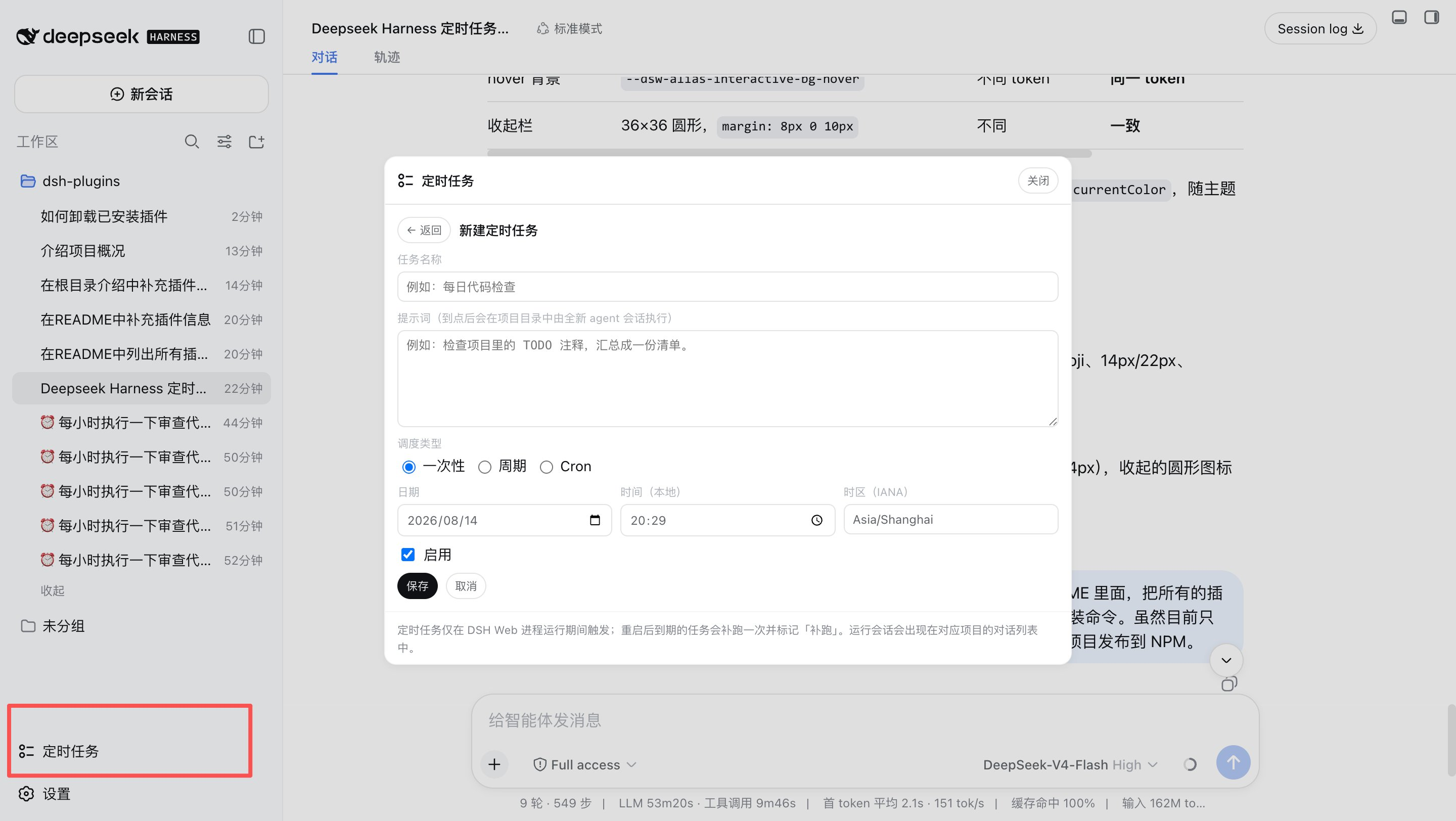
What it does
- Project-scoped tasks — each task belongs to a project directory (a DSH workspace). The panel lists tasks for the selected workspace.
- Three schedule kinds
at— run once at an absolute time (strict RFC 3339 instant, or a local date/time with an explicit IANA time zone; DST gaps are rejected, overlaps pick the earlier instant).every— run on a fixed creation-anchored interval (≥ 5 minutes); missed intervals are never replayed, only the latest due occurrence runs.cron— run on a cron calendar rule (five/six/seven-field expression, e.g.0 9 * * 1-5, evaluated in an explicit IANA time zone, DST-aware).
- Prompt execution — on schedule, a brand-new agent session is created in
the project directory with the task's prompt and driven to quiescence (the
same drive pattern as
dsh --profile headless). The run session appears in the project's conversation list with a pinned title (⏰ <task name>) and stays resumable; the final assistant text is also captured into the run record. - Per-task model override — each task may pin an explicit provider/model selection, picked from the grouped provider catalog in the panel (the same groups the DSH model selector renders, with the current default selection shown as the first option). Runs then use that model instead of the deployment default; the effective model of every run is recorded in its history. Leaving the picker empty follows the default selection.
- Run history — status (
running/completed/failed), start/finish times, output (truncated at 20 KB), error messages; newest first, capped at 20 records per task (configurable). - Manual run-now — runs a task immediately without touching its schedule.
- Lifecycle semantics
- Runs only while the DSH web process is alive. After a restart, overdue
one-shots run once and are marked
overdue; overdueeverytasks run only their latest due occurrence. - One-shot
attasks finish after their single run;everytasks stay active and advance to the next anchor-aligned target.
- Runs only while the DSH web process is alive. After a restart, overdue
one-shots run once and are marked
Architecture
A dual-face npm package installed into the web profile:
| Half | Entry | Role |
|---|---|---|
| Server | lib/index.js |
Cordis plugin: opens the scheduled_tasks storage domain (ctx.storageDomain), mounts the task store, the scheduler (bounded timers, clock-rollback-safe wakes), the headless executor, and the ctx.tasks typert service. |
| Protocol | lib/typert.js |
Host TYPERT face (tasks/* endpoints), auto-registered by dsh-typert-loader. |
| Browser | lib/client.js |
React panel mounted into the sidebar.footer.action slot; calls the host through the installed remote.tasks namespace. |
The client↔server channel is the DSH typert protocol (the same mechanism
dsh-commands uses): strict zod codecs validate every argument and result on
both sides, and no session needs to exist for the panel to work.
Install
dsh plugin --profile web add @opendsh/dsh-plugin-scheduled-tasks
Development
pnpm --dir src/plugins/dsh-plugin-scheduled-tasks typecheck   # tsc (TypeScript 7)
pnpm --dir src/plugins/dsh-plugin-scheduled-tasks test        # vitest
pnpm --dir src/plugins/dsh-plugin-scheduled-tasks build       # tsc emit + tsdown client bundle + loader wrapper
After changing sources, rebuild and re-sync the profile copy
(pnpm install inside the profile re-copies file: dependencies), then
restart dsh web — the plugin has no HMR channel.
Configuration
| Key | Default | Meaning |
|---|---|---|
maxConcurrentRuns |
2 |
Maximum concurrently running agent sessions across all tasks. |
keepRunsPerTask |
20 |
Run-history records retained per task (oldest pruned beyond the cap). |
Troubleshooting
Tool calls that fail with “Interrupted: interrupted” (underlying error
Cannot read properties of undefined (reading 'prepare')) are almost always a
duplicate @deepseek-ai/dsh-tools copy caused by declaring DSH packages in
dependencies instead of peerDependencies. See
docs/troubleshooting.md for the full write-up.
Limitations
- Schedules fire only while the web process is running (same posture as
dsh-schedule); there is no external wake-up when the process is down. - Each run consumes model tokens with the task's pinned model, or the current default model when the task pins none — the panel says so explicitly.
- Run history is refreshed by polling while the panel is open (10 s interval); push updates are deferred work.
Comments
Comments live in GitHub Discussions. Sign in with GitHub to post or react.