
Install
Inside DeepSeek Harness, with dsh-market
dsh plugin --profile web add dshmarket
Or from the command line
dsh plugin --profile web add dsh-toolbox-web
Installing runs third-party code with your own permissions — it can read your files, use your credentials and reach the network. Review the source first, and pin a commit (github:owner/repo#sha) when you can.
README
A toolbox plugin for dsh (DeepSeek Harness): session management / trash bin / subdirectory management / full-text search / preset editing / config editing / archive management.
✨ Features
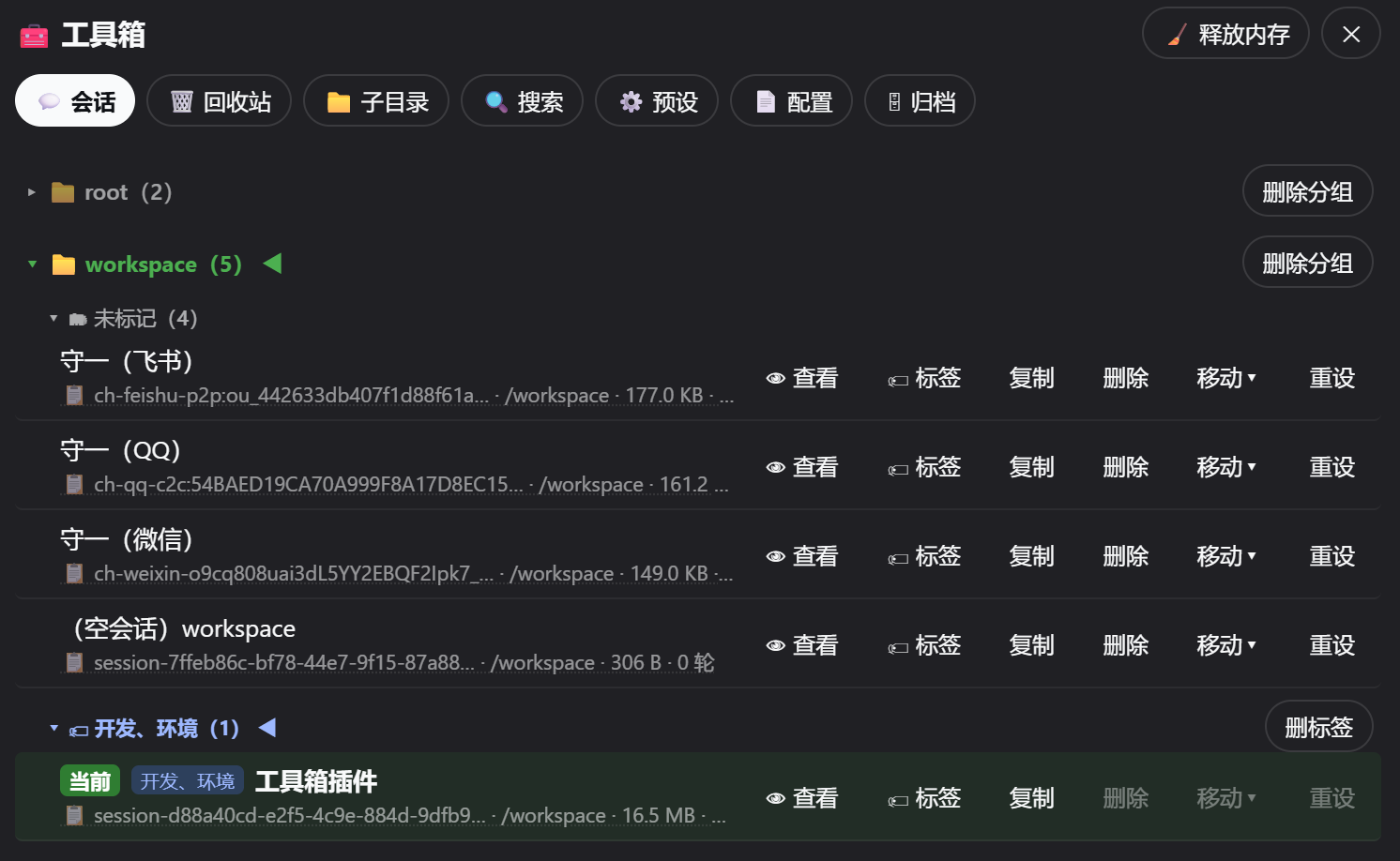
- 💬 Session Management: delete (to trash), duplicate (official fork with
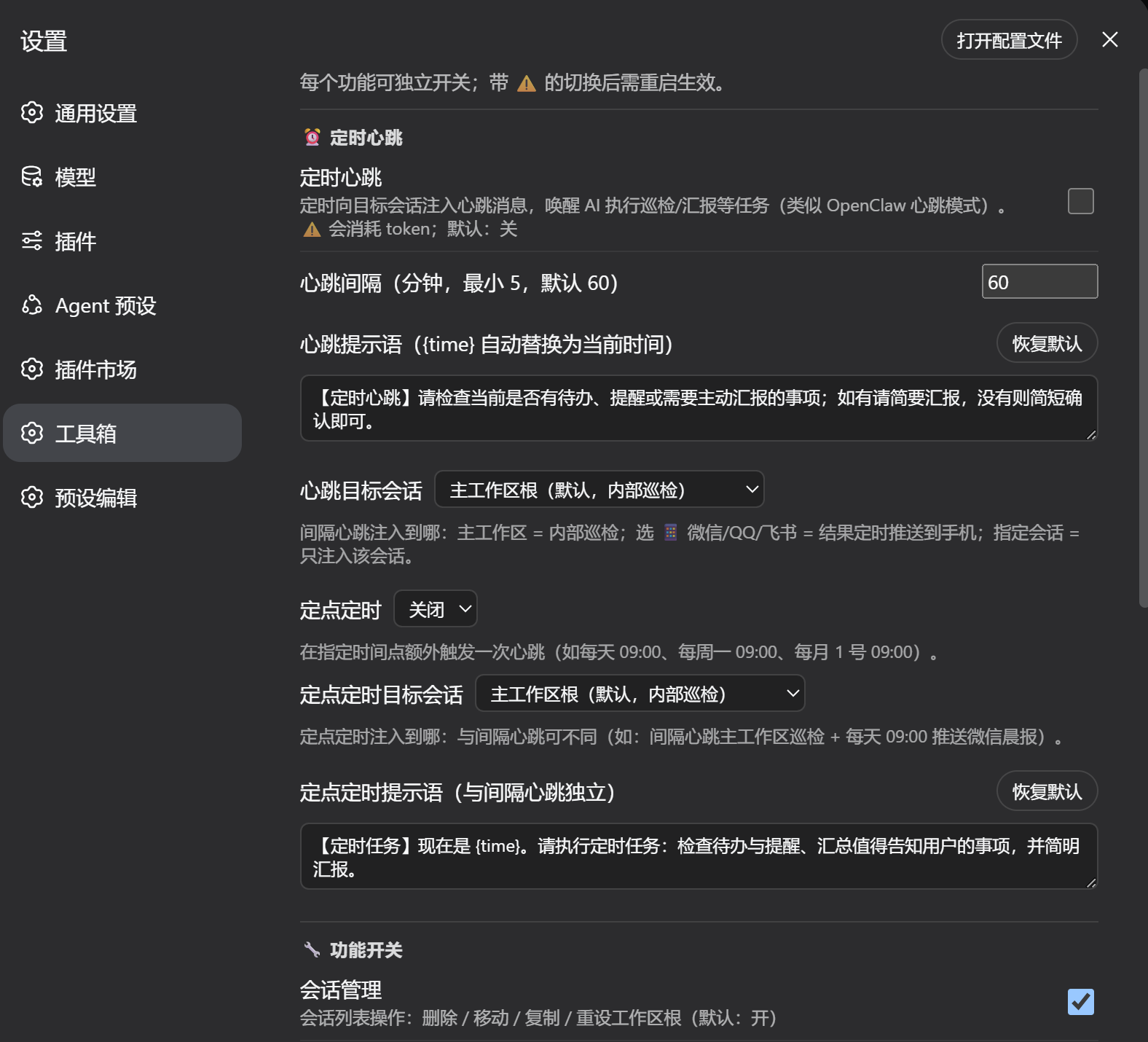
-copyNnaming), move (between workspaces), reset workspace root, tag grouping (click-to-select editor for existing tags to avoid typos; tag management: delete/rename, renaming merges duplicates), view session content (read-only), conversation management (truncate/edit, disabled by default), empty sessions auto-labeled as(empty session) workspace-name - ⏰ Scheduled Heartbeat: wake the AI on a schedule to run checkups/reports (OpenClaw-style heartbeat) — two schedulers: interval heartbeat (every N minutes) and fixed-time schedule (daily at HH:mm / weekly on a weekday / monthly on a date), each with its own prompt and target; targets can be the main workspace root (internal checkup), any session, or 📱 WeChat / QQ / Feishu IM channels (wakes the channel bot and pushes the AI reply back to your phone). The scheduler runs in the dsh backend process — no need to keep the web page open; the dsh service running is enough. Channel push is an optional integration: it depends on the
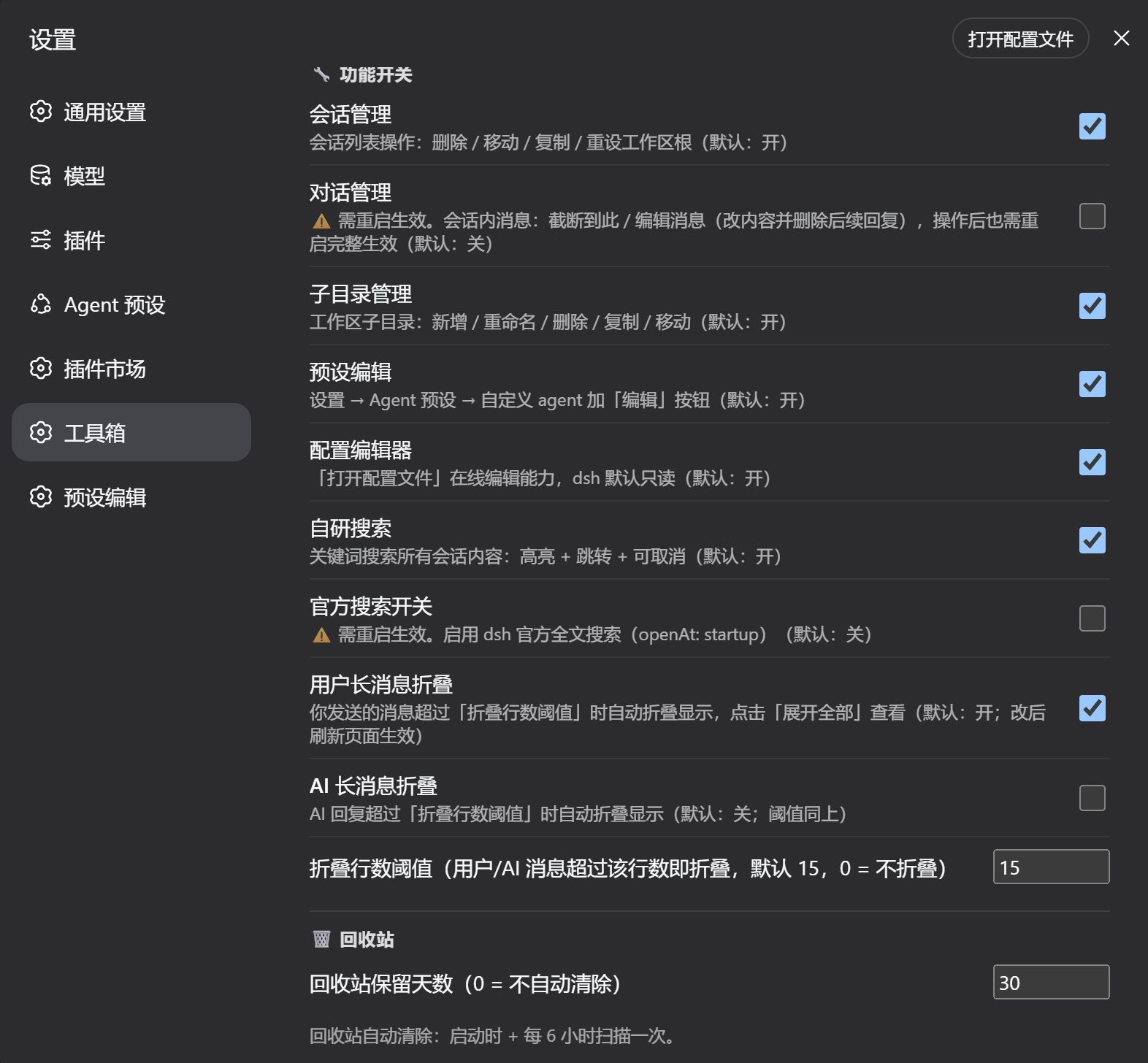
dsh-channels-pushservice provided by our in-house channel bridge plugin dsh-msg-hub (see "IM Channel Push (optional)" below); without it the heartbeat automatically falls back to the main workspace root - 📃 Long-message Collapse: messages longer than the threshold (15 lines by default, configurable) auto-collapse with an "expand all" button; on by default for user messages, off for AI replies (pure render-layer enhancement, no data modification)
- 🗂 View-Tag Collapse: collapse/expand the row of conversation view tabs (Memory / Skills / Todos / Settings… from the conversation.view slot) with one click — collapsed by default, state remembered; the toggle button sits next to "Export" in the session header; dedicated switch at the top of the toolbox Settings page (on by default; turning it off removes the button and keeps tabs always expanded)
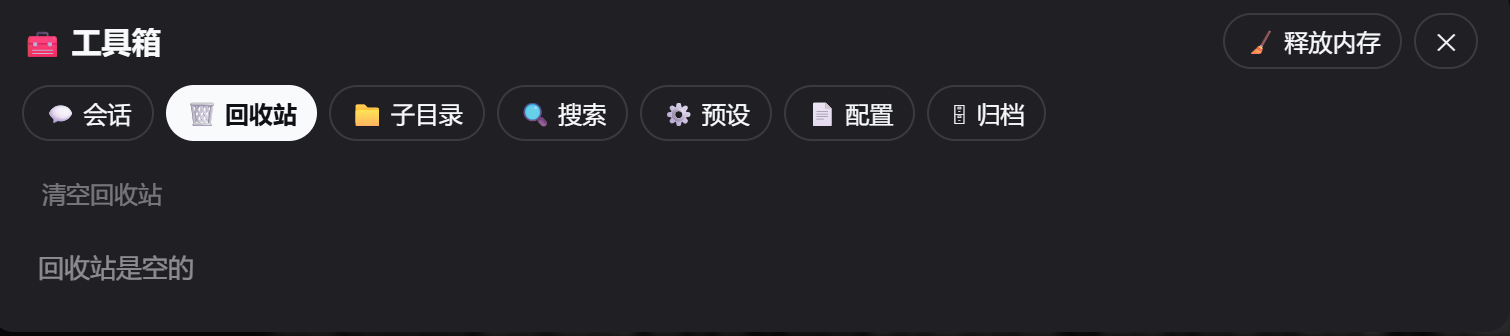
- 🗑️ Trash Bin: deleted sessions/subdirectories go to trash (30-day retention by default, configurable); restore / purge / preview deleted session content
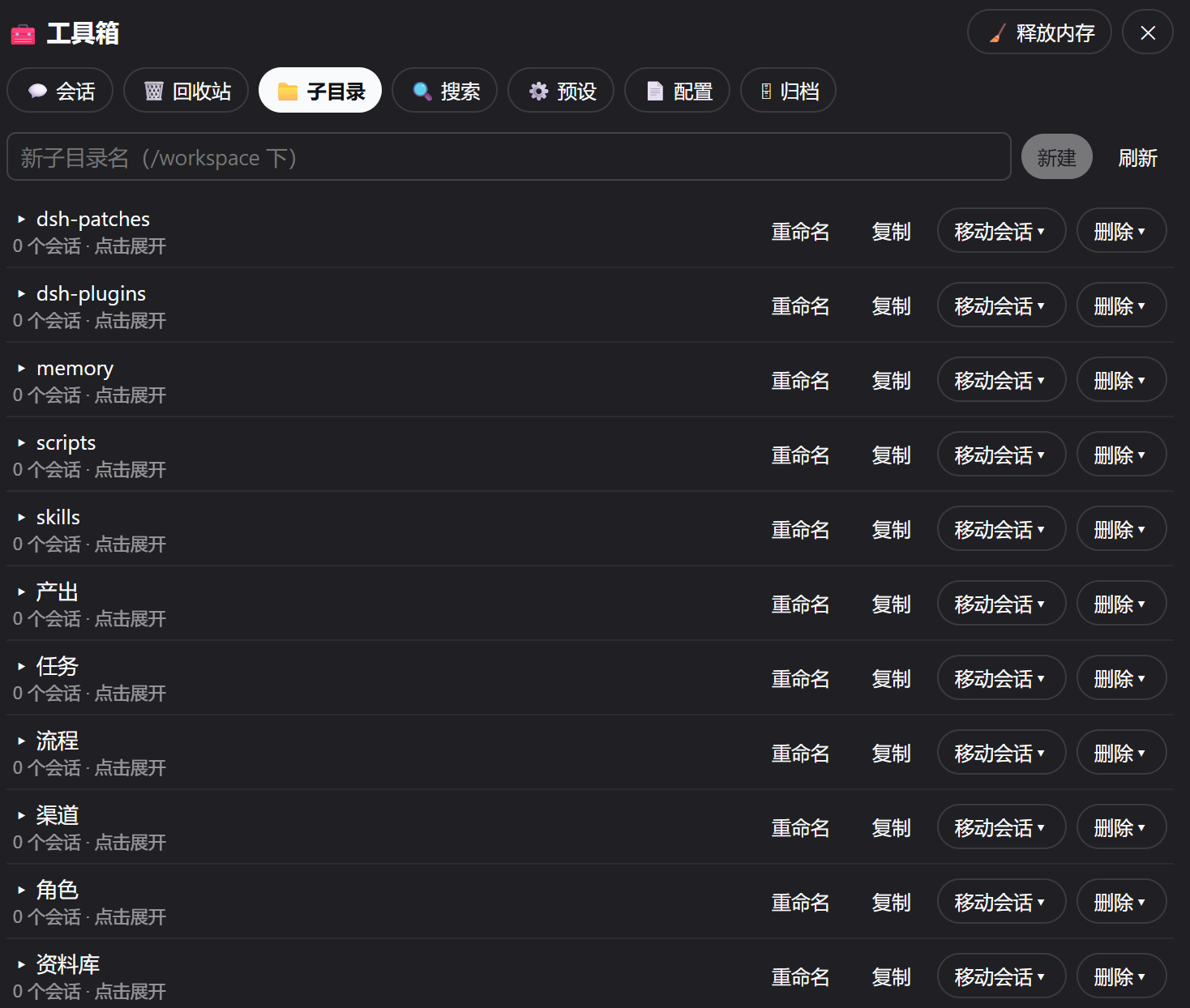
- 📁 Subdirectory Management: create / rename / delete / duplicate directories under a workspace, batch-assign sessions
- 🔍 Search: full-text search with official SQLite index engine first (no session-file reads, lowest memory), falling back to in-house frame-by-frame scan; results grouped by scope (visible / archived / trash / subagent sessions, switch instantly after one search); time-range filter (today/yesterday/this month/last month shortcuts); snippet preview + click-to-locate highlight; 120s per-keyword cache; semantic search (optional, online embedding: relevance threshold 0-100 default 80, result limit configurable, literal-match boost). ⚠️ Search is off by default (memory); self-built/semantic search decompresses sessions and requires a DSH service restart to fully release memory
- ⚙️ Preset Editing: edit Agent preset files online
- 📄 Config Editing: edit dsh config file online (YAML validation + atomic write)
- 🗄 Archive Management: view / restore / delete officially archived sessions
- 🧹 Release Memory: clear plugin caches and attempt GC (full release still requires a dsh restart)
📸 Screenshots
Session Management (delete / duplicate / move / reset / tags / view / empty-session labeling):
Trash Bin (deleted sessions go to trash; restore / purge / preview):
Subdirectory Management (create / rename / delete / duplicate directories under a workspace):
Settings (per-feature toggles + scheduled heartbeat / collapse threshold etc.):
Requirements
- dsh runtime (loaded as a dsh plugin; the frontend relies on
react,@deepseek-ai/dsh-client-ui-primitives, etc., injected by the dsh web runtime) - Node.js ≥ 22.13 (session files are decompressed via the zstd support in
node:zlib) - Platform: cross-platform (Node built-in APIs only, no shell dependency). Default paths follow the Linux convention (
/home/dsh,/workspace); on Windows / macOS, set theDSH_HOMEandDSH_CHANNELS_CWDenvironment variables to your actual directories (see "Environment Variables" below)
Installation
Option 1: dsh CLI (recommended)
# From a GitHub repository (auto-clone + install deps)
dsh plugin --profile web add github:AbcdefgXW/dsh-toolbox-web

# Or from npm if published
dsh plugin --profile web add dsh-toolbox-web
If it is not auto-registered, add to cordis.patch.yml in the profile:
- insert:
    - id: dsh-toolbox-web
      name: dsh-toolbox-web
Option 2: Manual
git clone https://github.com/AbcdefgXW/dsh-toolbox-web.git
cd dsh-toolbox-web
npm install --omit=dev
Place the plugin directory on the dsh plugin load path (e.g. $DSH_HOME/plugins/ or a compose mount), register it as above, then restart dsh web.
@deepseek-ai/*packages are shipped with the dsh runtime; their versions track the dsh release.js-yamlis a plugin-level dependency (used for config-editing validation).
Uninstall
# Option 1: dsh command
dsh plugin --profile web remove dsh-toolbox-web

# Option 2: manual
# 1. Remove "dsh-toolbox-web" from dsh.profile.bundles in the profile package.json
# 2. rm -rf $DSH_HOME/profiles/web/node_modules/dsh-toolbox-web
# 3. rm -rf <plugin-dir>/state  (trash/settings/index data)
# 4. Restart dsh web
Crash Recovery (vi emergency manual)
① duplicate loader entry id: xxx (most common) — the plugin is registered twice (bundles + a manual insert):
vi /home/dsh/profiles/web/cordis.patch.yml
# Delete any manual block like:
#   - insert:
#       - id: dsh-toolbox-web
#         name: 'dsh-toolbox-web'
# Keep sandbox-policy / approval system config untouched
② cannot resolve profile bundle "xxx" (missing dependency)
vi /home/dsh/profiles/web/package.json   # check bundles vs dependencies
ls -la /home/dsh/profiles/web/node_modules/ | grep dsh-
ln -s /path/to/plugin /home/dsh/profiles/web/node_modules/plugin-name   # restore symlink
Fastest rollback: backups are kept before changes:
ls /home/dsh/profiles/web/cordis.patch.yml.bak-*   # patch backups
ls /home/dsh/profiles/web/package.json.bak-*       # package.json backups
cp <backup> /home/dsh/profiles/web/cordis.patch.yml
Restart dsh after editing; check logs with docker logs deepseek-harness if it still fails.
Usage
After restarting dsh web, hard-refresh the browser (Ctrl+Shift+R):
- 🧰 Toolbox (bottom-left button; monochrome icon in the collapsed rail / on mobile) — 8 tabs (Search is hidden by default):
- ⚙️ Presets: edit Agent presets online (
~/.agent-presets) - 📄 Config: edit the dsh config file online (YAML validation + atomic write)
- 📁 Subdirectories: create / rename / delete / duplicate dirs under a workspace, batch-assign sessions
- 💬 Sessions: sessions grouped by workspace/tag; per row: delete (to trash), duplicate (
-copyN), move, reset workspace root, tag, view content; empty sessions labeled(empty session) - 🗑️ Trash: deleted sessions/subdirectories — restore / purge / preview
- 🧬 Subagents: sub-agent sessions are managed separately (grouped by parent session; view / open / delete to trash) instead of being mixed into the session list
- 🗄 Archive: view / restore / delete officially archived sessions
- 🔍 Search: full-text search across sessions, highlight + click-to-jump
- ⚙️ Presets: edit Agent presets online (
- Settings → Toolbox: feature toggles + scheduled heartbeat config
- ⏰ Scheduled Heartbeat (optional, OpenClaw-style): Settings → Toolbox → Scheduled Heartbeat
- toggle + interval (minutes) + prompt (
{time}replaced with current time) + countdown to next run - fixed-time schedule: daily / weekly weekday / monthly date, with its own prompt and target
- targets: main workspace root (internal checkup) / any session / 📱 WeChat·QQ·Feishu (needs dsh-msg-hub; results pushed to your phone)
- the scheduler runs in the dsh backend process — no need to keep the web page open
- toggle + interval (minutes) + prompt (
- 📃 Long-message Collapse (on by default): messages beyond the threshold auto-collapse with an "expand all" button (threshold configurable)
Environment Variables
| Variable | Purpose | Default |
|---|---|---|
DSH_HOME |
dsh data directory (sessions/config/caches) | /home/dsh |
DSH_CHANNELS_CWD |
current workspace root (session cwd base) | /workspace |
Defaults apply when unset; all other paths are derived from the plugin's own directory (import.meta.url) — no hardcoded paths.
Data & Safety
- Runtime data lives in the plugin
state/directory (settings, trash, backups, tags) — excluded from the repo via.gitignore - The plugin reads/writes:
$DSH_HOME/sessions/(session files, multi-frame zstd),$DSH_HOME/storages/workspace.json(workspace registry), and the dsh config file (only when using the config editor) - Delete = move to trash (30-day retention by default, restorable) — never a physical delete
- IM channel push notes: when scheduled heartbeat pushes to IM channels, WeChat uses a simulated web protocol (ilinkai) — frequent proactive messaging carries account risk-control risk; keep the interval ≥ 15 minutes, keep prompt content normal, and avoid bursts of pushes. QQ Open Platform proactive messages require applying for the "proactive message permission" (pushes fail silently without it). Feishu uses the official API — compliant and safe.
IM Channel Push (optional)
The "📱 WeChat / QQ / Feishu" targets of scheduled heartbeat are an optional integration: dsh-toolbox-web calls the dsh-channels-push cordis service to "wake the channel bot → push the AI reply back to the IM".
- dsh-msg-hub is our in-house channel bridge plugin (WeChat ilinkai / QQ Open Platform / Feishu Open Platform); it is not distributed with this repository — install it separately (dsh-msg-hub)
- Without that service: channel targets are unavailable (a "channel push service unavailable" note is shown), and heartbeat to the main workspace root / any session is completely unaffected
- A third-party channel plugin exposing the same service name can also be integrated (currently an implementation convention, not a public adapter spec)
- Conversation management (truncate/edit): modifies session files and requires a dsh restart to take full effect; disabled by default, enable it explicitly in settings
Development
index.jsbackend (cordis Service + typert remote, method name = endpoint name);client.jsfrontend (no build pipeline, loaded viawindow.__ModuleLoader__)- Adding an endpoint requires three synchronized edits: backend method + backend
invocationregistration + frontendDESCRIPTORS - Rewriting session files must use the official multi-frame format (
lib/zstd.js compressSessionText: a header frame with exactly one line + event frames of 500 lines each); a single-frame compression breaks the dsh loader
License
MIT — see LICENSE
Comments
Comments live in GitHub Discussions. Sign in with GitHub to post or react.