
Install
Inside DeepSeek Harness, with dsh-market
dsh plugin --profile web add dshmarket
Or from the command line
dsh plugin --profile web add @99galaxy/dsh-plugin-market
Installing runs third-party code with your own permissions — it can read your files, use your credentials and reach the network. Review the source first, and pin a commit (github:owner/repo#sha) when you can.
Screenshots
README
This plugin publishes its README in Chinese only.
在 DeepSeek Harness 的设置面板里逛插件市场,一键安装。
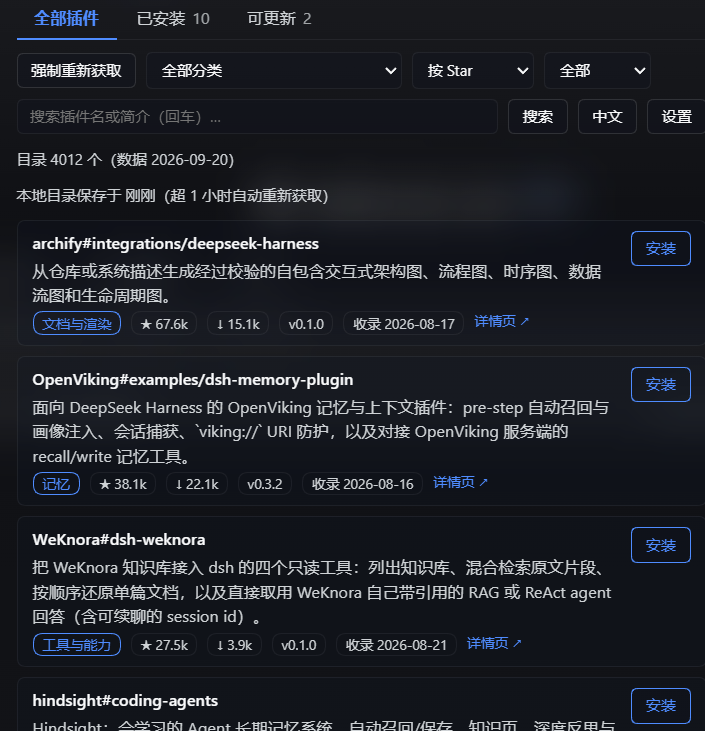
A plugin-market settings page for DeepSeek Harness: browse the community catalog, see what you already have on its own tab, and install with one click.
数据来自 awesome-dsh-plugin 维护的
官方目录 plugins.json —— 约 3,500+ 个插件、23 个双语分类,带 Star 数、下载量、收录日期,
以及每个条目的官方安装命令。
它做什么
设置面板里新增一节 「DSH 插件市场」,页面内有三个标签:
| 标签 | 内容 |
|---|---|
| 全部插件 | 完整目录。可按分类筛选、按 Star/下载量/名称/收录时间排序、搜索插件名或简介 |
| 已安装 | 只列出你已经装过的插件,标签上直接显示数量 |
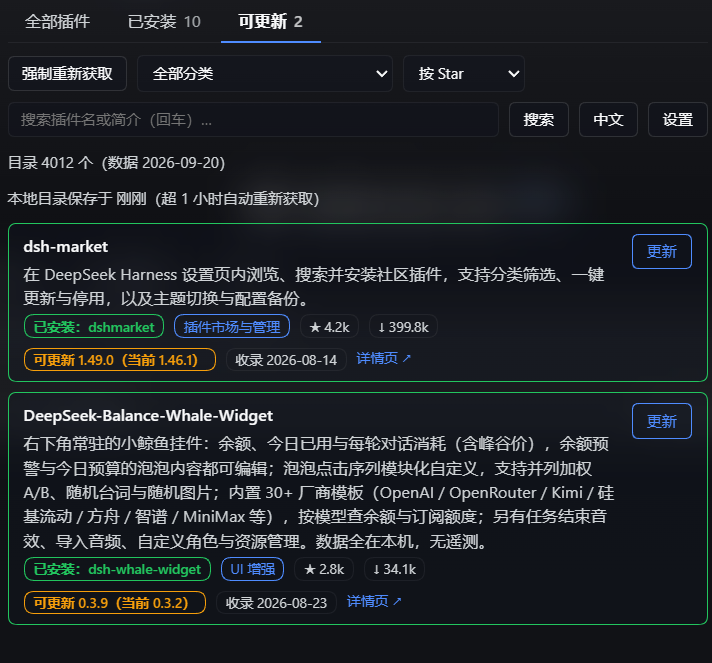
| 可更新 | 只列出装了但目录里有更新版本的插件,标签上直接显示数量 |
- 一键安装:点「安装」即执行该条目的官方安装命令,装到当前 profile
- 安装状态:已安装的条目带绿色徽章;若目录名与你实际装的包名不同,会标出真实包名
- 更新检测:拿目录里的
version和 profile 里实际装的版本比对,有更新的挂橙色徽章 「可更新 1.47.0(当前 1.46.1)」,按钮从「重新安装」变成「更新」 - 中英切换:简介可切中文/英文
- 本地缓存:目录存到本地,1 小时内直接复用;要最新的点「强制重新获取」
- 四级降级:官方域名 → 镜像 → CDN → npm,任一条通即可
安装
这是一个 DSH bundle:装进 profile 后重启 DSH 自动加载。
cd ~/.dsh/profiles/web          # 换成你的 profile 目录
pnpm add github:99galaxy/dsh-plugin-market
也可以显式用 HTTPS 地址:
pnpm add https://github.com/99galaxy/dsh-plugin-market
装进来的包名是 @99galaxy/dsh-plugin-market —— 与仓库名不同,所以下面层列表里要写这个
带 scope 的名字。
然后把它加进 package.json 的层列表 —— 声明了 dsh.bundle 的依赖才会被加载:
{
  "dsh": {
    "profile": {
      "bundles": ["...", "@99galaxy/dsh-plugin-market"]
    }
  }
}
重启 DSH。
github:前缀在部分 git 配置下会被解析成git+ssh,而匿名 HTTPS 不需要任何凭据。 若 pnpm 报找不到仓库或索要 SSH 密钥,改用上面的 HTTPS 形式。
使用
- 打开设置 → DSH 插件市场
- 浏览或搜索;点卡片右侧「安装」
- 安装完成后重启 DSH,插件才会加载
「已安装」标签里可以确认某个插件是否已经在你的 profile 里;「可更新」标签里是可以升级的那些。
关于「更新」:它执行的仍是目录里那条安装命令,所以装的是目录指定的那个来源 —— 一个用
github:装的插件,如果目录对应的条目是 npm 包名,更新后会变成 npm 包。 想留在固定 commit 上就别点更新。判断不了的插件:目录里没有
version、或目录根本没收录的插件,无法判断有没有更新。 它们不会出现在「可更新」标签里,但标签内会单独说明有多少个 —— 免得把「判断不了」误读成「已经是最新」。
架构
┌─ 浏览器半边 ────────────────────────────────────────────────┐
│  window.__ModuleLoader__.load({ id, factory(require) })     │
│  require('react');槽位服务由 ctx 注入                       │
│  settings.section → 一个「DSH 插件市场」页面                 │
│      页面内三个标签:全部插件 / 已安装 / 可更新              │
│  筛选、排序、分页、更新比对全部在宿主侧完成                  │
└───────────────┬─────────────────────────────────────────────┘
                │ fetch()  ← 不是动态插件的私有 RPC,也不是 ctx.remote
┌───────────────▼─────────────────────────────────────────────┐
│  宿主半边  index.js                                          │
│  ctx.inject(['webServer']) →                                │
│    GET  /dsh-plugin-market/list                             │
│    POST /dsh-plugin-market/install                          │
│  子进程输出经**文件描述符**捕获(非管道、非 shell)           │
└───────────────┬─────────────────────────────────────────────┘
                │ spawn(node, [market-core.mjs, …])
┌───────────────▼─────────────────────────────────────────────┐
│  market-core.mjs(真实文件,可单独运行)                      │
│    catalog   抓取/缓存目录(官方 → 镜像 → CDN → npm)         │
│    installed 读 profile 依赖 + node_modules + 已装版本        │
│    install   用 profile 记录的 pnpm 主版本执行安装            │
└─────────────────────────────────────────────────────────────┘
为什么用 HTTP 而不是 ctx.remote
浏览器半边要调用宿主能力,但 ctx.remote.<ns> 的方法来自 DSH 的 Typert 代码生成 ——
本地手写的插件无法注册自己的命名空间(ctx.remote.$mount() 只接受生成的贡献)。
而 webserver 的命名路由注册是公开服务:
ctx.inject(['webServer'], (host) => {
  host.webServer.register({ kind: 'exact', path: '…', handler: (req, res) => {} })
})
于是宿主暴露两条路由,浏览器半边用 fetch 调用。
HTTP 接口
| 方法 | 路径 | 入参 | 出参 |
|---|---|---|---|
GET |
/dsh-plugin-market/list |
bypass, category, q, sort, only, limit, offset(only 取 all / installed / notinstalled / updatable) |
{ ok, payload: { items, categories, count, total, matched, installedTotal, updatableTotal, unknownTotal, offset, sort, only, category, q, catalogFromCache, fetchedAt, catalogUpdated, source, note } } |
POST |
/dsh-plugin-market/install |
{ install, name? } |
{ ok, spec, seconds, log } |
items 里的每个条目除了插件本身,还带 installed / installedAs / installedVersion / update。
updatableTotal 是可更新数,unknownTotal 是判断不了的数(目录里没有版本,或目录没收录已声明的 bundle);普通 profile 依赖不计入。
更新判断只比对目录里的 version,不额外发任何网络请求。
bypass=1 是唯一的强制重新抓取旗标;只有「强制重新获取」按钮发它,其余调用都只做新鲜度检查。
三个标签也是页面内的:插件只注册一个 settings.section,另外两个标签由页面自己渲染。
两条路由只接受同源调用(校验 Sec-Fetch-Site 与 Origin),安装接口还要求
Content-Type: application/json —— 直接挂在 webServer 上的路由不受 DSH /api 那道
browser-trust fence 保护,所以插件自己拦。安装命令里的包名若以 - 开头会被拒绝
(它会成为 pnpm 的一个选项而不是包名)。
包内容
package.json          声明 dsh.bundle.patch 与 dsh.client.platform
cordis.patch.yml      把自己插进 profile 的层栈
index.js              宿主半边:两条 HTTP 路由
market-core.mjs       市场逻辑(生成物,请勿手改)
client/client.js      浏览器半边:单个设置页 + 页内三个标签
market-core.mjs 由源生成后一并提交,所以 clone 下来即可安装,不需要任何构建步骤。
许可
Comments
Comments live in GitHub Discussions. Sign in with GitHub to post or react.