
Install
Inside DeepSeek Harness, with dsh-market
dsh plugin --profile web add dshmarket
Or from the command line
dsh plugin --profile web add github:1985899182/dsh-harness-chat-control
Installing runs third-party code with your own permissions — it can read your files, use your credentials and reach the network. Review the source first, and pin a commit (github:owner/repo#sha) when you can.
README
Bring ChatGPT-like conversation interactions to DSH Desktop.
Project goal: reproduce ChatGPT's two quote-based conversation workflows.
- Quote in the main chat: quote an answer and continue asking in the same conversation.
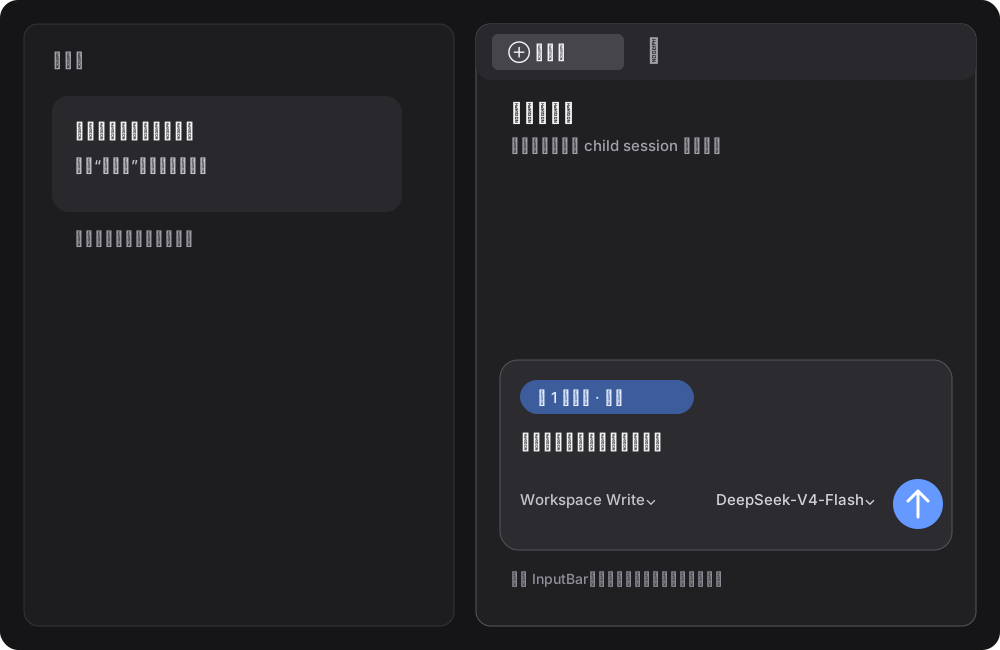
- Quote in the sidebar chat: carry the quote into Better Sidebar and ask in an independent sidebar session without changing the main chat.
UI examples
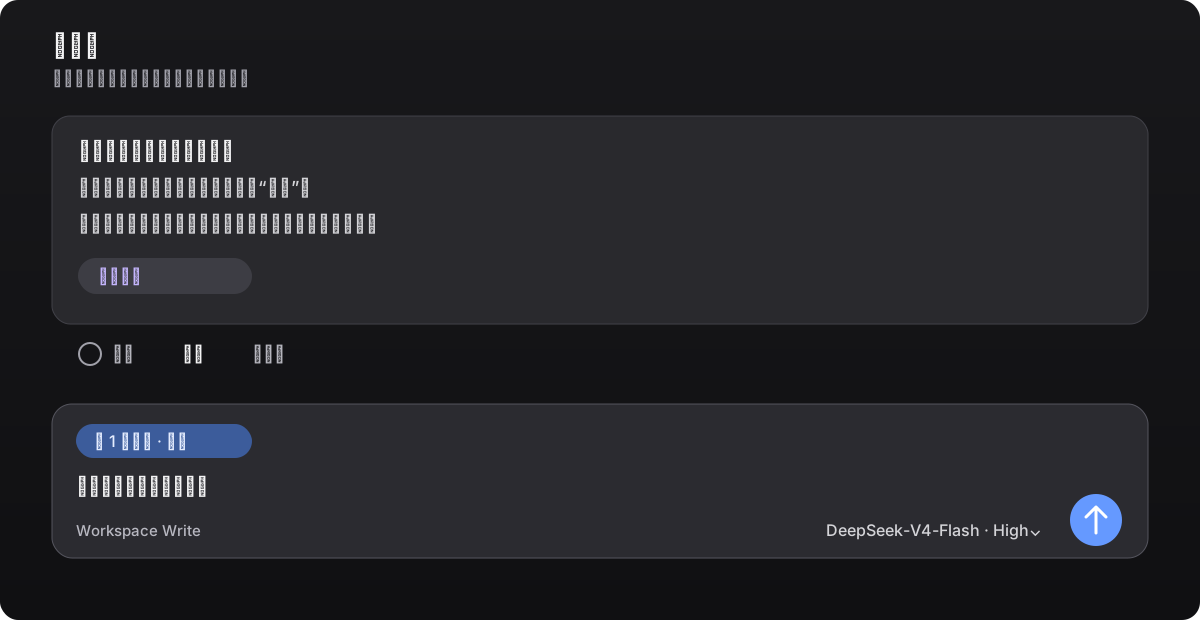
Quote in the main chat
Select text in an answer or click Quote in its action bar. The quote stays in the composer as an annotation chip; edit your question before sending.
Quote in the sidebar chat
Click Ask in sidebar or choose Ask in sidebar chat from the text-selection toolbar. The sidebar keeps Better Sidebar's native composer and model selector. Text outside the quote chip is entirely user input, and nothing is sent until you click Send.
Features
- Main-chat quotes: quote a full answer or a selected fragment without leaking Markdown markers such as
>or---into the prompt. - Native annotation chip: the composer shows the quote as a
1 annotationchip. You can edit the question or remove the chip before sending. - Embedded sidebar: embeds and pins the
dsh-better-sidebar@0.17.1SideChatView, transcript mapping, and styles. It works without Better Sidebar installed, and this project's sidechat remains authoritative when another version is present. - Sidebar quote: keeps Better Sidebar's native conversation layout and DSH's session/model capabilities. Main and sidebar sessions stay independent.
- Model selection: the native model selector applies only to the current sidebar session.
- Edit and resend: click the pencil next to a user message to load the original text into the native composer. Sending replaces the visible branch in the same conversation instead of creating duplicate chats.
- Stop generation: reuses DSH's native stop/send state and does not intercept or submit native events twice.
The plugin adds the quote chip, entry points, and session routing; the sidebar layout, transcript, and child-session lifecycle come from the pinned Better Sidebar 0.17.1 source so another plugin version cannot take over.
Compatibility
| Component | Version |
|---|---|
| DSH Desktop (Windows) | 0.7.2 |
DeepSeek Harness / @deepseek-ai/dsh |
0.1.2-alpha.1 |
dsh-better-sidebar |
0.17.1 |
| Node.js | >=20 |
| pnpm | 10.x or 11.x |
dsh-better-sidebar@0.18.x targets Harness 0.1.2-rc.1+ and reads connection.state.getSnapshot(), which is not available in alpha.1. Pin Sidebar to 0.17.1 on DSH Desktop 0.7.2; otherwise opening a new chat may fail with Cannot read properties of undefined (reading 'getSnapshot').
Install
Use the DSH plugin command for every installation. Fully quit DSH Desktop, then run this in Windows PowerShell:
$env:DSH_HOME = "$env:APPDATA\dsh-desktop\harness"
dsh plugin --profile web add --save-exact --allow-build=node-pty "git+https://github.com/1985899182/dsh-harness-chat-control.git#v0.2.64"
If dsh is not on PATH, use the CLI bundled with DSH Desktop; it still executes the same dsh plugin install command:
$desktopNode = 'D:\DSH\DSH Desktop\resources\app\node_modules\node\bin\node.exe'
$desktopDsh = 'D:\DSH\DSH Desktop\resources\app\node_modules\@deepseek-ai\dsh\lib\bin.js'
$env:DSH_HOME = "$env:APPDATA\dsh-desktop\harness"
& $desktopNode $desktopDsh plugin --profile web add --save-exact --allow-build=node-pty "git+https://github.com/1985899182/dsh-harness-chat-control.git#v0.2.64"
The explicit HTTPS Git URL prevents pnpm from interpreting GitHub shorthand as SSH. If your network requires a proxy, set HTTP_PROXY, HTTPS_PROXY, or ALL_PROXY before running the command. After a first install, or when the plugin is not already live, fully restart DSH Desktop; for a live upgrade, follow DSH's refresh prompt.
If the profile already uses Sidebar 0.18.x, use the same dsh plugin command to pin the compatible version first:
$desktopNode = 'D:\DSH\DSH Desktop\resources\app\node_modules\node\bin\node.exe'
$desktopDsh = 'D:\DSH\DSH Desktop\resources\app\node_modules\@deepseek-ai\dsh\lib\bin.js'
$env:DSH_HOME = "$env:APPDATA\dsh-desktop\harness"
& $desktopNode $desktopDsh plugin --profile web add --save-exact --allow-build=node-pty dsh-better-sidebar@0.17.1
Then run the standard install command above.
Usage
- Main chat: click Quote in an answer's action bar, or select text and choose Add to chat; add your question and send it.
- Sidebar chat: click Ask in sidebar, or choose Ask in sidebar chat from the selection toolbar; select a model, enter your question, and send it.
- Edit and resend: click the pencil beside a user message, edit the text in the native composer, and send. The new answer appears at the original position.
Development
npm test
This validates the manifest, loader declarations, PowerShell installer, and JavaScript syntax.
Release
Current milestone: v0.2.64, validated against DSH Desktop 0.7.2 / Harness 0.1.2-alpha.1, with dsh-better-sidebar@0.17.1 sidechat embedded. The sidebar now uses DSH's native InputBar model-selection and image-admission path (imageIds → serializeDraftImages → admitEncodedImages) instead of a text-only side route. Recheck native Slots, sidechat API, and state interfaces after upgrading DSH or the Harness major version.
License
MIT
Comments
Comments live in GitHub Discussions. Sign in with GitHub to post or react.