
安装
在 DeepSeek Harness 里通过 dsh-market 安装
dsh plugin --profile web add dshmarket
或使用命令行
dsh plugin --profile web add github:lemonorangeapple/dsh-effort-switcher
装任何插件都等于在你的机器上跑第三方代码,权限和你本人一样大——能读你的文件、用你的凭据、访问网络。请先审阅源码,并尽量锁定 commit(github:owner/repo#sha)。
截图
README
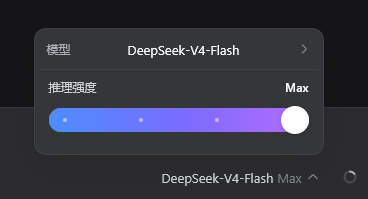
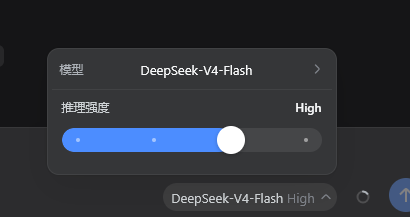
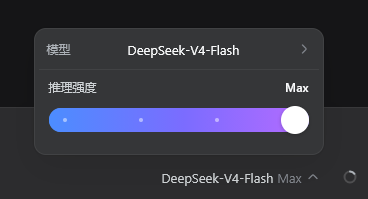
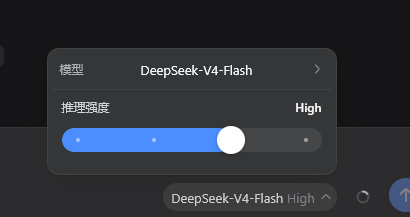
将 DSH Web 聊天输入区原有的模型/推理强度选择入口替换为推理强度滑动条。滑块会调用 DSH 的 modelDirectories 服务提交当前模型的 reasoningEffort,因此设置会作用于后续请求。
屏幕截图
要求
- DSH
0.1.0-rc.6或兼容的 Web profile。0.1.2-rc.1、0.2.0-rc.2与0.2.1-alpha.2已在真实 Web 端启动并实测(拖动、点击、方向键均能写入);0.1.0-rc.6也已在真实 Web 端实测通过。桌面端(Electron)尚未在真机实测,见docs/desktop-test-prompt.md。触发器的尺寸、字号与圆角按 DSH 0.2.x 的原生模型座位对齐;在 0.1.0-rc.6 上宿主座位同为 28px / 13px,仅字重(500 对 400)和圆角(24px 回退值)略有差别。 - 当前模型必须暴露至少一个 reasoning effort 级别。普通非推理模型不会显示滑块。
安装
dsh plugin --profile web add github:lemonorangeapple/dsh-effort-switcher
命令会把本包装进当前 Web profile,并因 dsh.bundle 声明自动写入 dsh.profile.bundles。不必再编辑 profile 的 cordis.patch.yml。
完全停止并重新启动 dsh web,然后刷新 http://127.0.0.1:3080。DSH 仅在 Web 进程启动时扫描 dsh.client 元数据;仅刷新旧页面或运行独立开发服务器不会加载本插件。
如果 profile 的 cordis.patch.yml 里还留着旧的手工挂载(id: effort-switcher),先删掉,避免双重挂载。
卸载
dsh plugin --profile web remove dsh-effort-switcher
卸载后同样需要重启 dsh web。
验证安装
在 profile 目录中运行:
node --input-type=module -e "const plugin=await import('dsh-effort-switcher'); console.log(plugin.name)"
预期输出:
effort-switcher
启动 DSH Web 后,选择一个支持 reasoning effort 的模型。聊天输入区模型控件的位置应显示“推理强度”滑块;拖动滑块后,DSH 会重新提交当前模型及新的 reasoningEffort。
项目结构
index.js           Browser client module and slider UI.
host.js            Minimal Cordis host entry used by DSH loader discovery.
cordis.patch.yml   Bundle patch that inserts the host plugin row.
package.json       Package exports, dsh.bundle, and dsh.client manifest.
README.md          Installation and operating instructions.
docs/desktop-test-prompt.md  Prompt for an agent to test the plugin on the Electron desktop app.
.gitignore         Local development exclusions.
开发
从本仓库目录把本地 checkout 链进 Web profile:
dsh plugin --profile web add .
修改 index.js 后,必须重启 dsh web 并刷新现有 Web GUI,除非当前 DSH checkout 已运行针对该客户端包的 HMR 构建监视器。
可运行基础语法检查:
npm run check
排障
- 滑块没有显示:确认
dsh.profile.bundles中存在dsh-effort-switcher,完全重启dsh web,并在模型选择器中选用支持 reasoning effort 的模型。 - 安装后页面未更新:Web 启动图已经生成;停止旧
dsh web进程后重新启动。 - 双重控件或重复挂载:删掉 profile
cordis.patch.yml里旧的effort-switcherinsert,只保留 bundle 层。 - 拖动后未生效:检查模型是否支持多个 reasoning effort 级别。对于仅有默认强度或不支持 reasoning 的模型,插件会隐藏控件。
- 显示的是官方模型选择器,像没装插件一样:打开浏览器控制台,若有
slot entry crashed in 'conversation.input.model',插件的座位渲染崩溃,DSH 便退回官方选择器。DSH 0.1.2 起modelDirectories.directoryFor()会读取调用方上下文里的remote.session,插件必须声明它(cannot get property "remote.session" without inject);本插件会按宿主实际提供的服务自动声明,请更新到包含此修复的版本并重启dsh web。 - 滑条或滑块变成圆角方块:DSH 0.1.2 起主题给所有元素设置了
corner-shape: superellipse(1.5),border-radius的圆会被画成圆角方块。本插件对滑条自身的轨道、填充、旋钮和刻度点显式使用corner-shape: round,菜单与触发器仍跟随 DSH 的圆角风格。 - 滑块弹回并出现红色提示:DSH 拒绝了这次写入(例如会话被占用、模型不支持该强度)。滑块会回到真实强度并显示原因,再拖一次即可重试。
- 在模型切换进行中松开滑块:这次选择会被保留,待 DSH 空闲后自动提交,不会丢失。
评论
评论存放在 GitHub Discussions。用 GitHub 账号登录后可发表评论或点表情。