
安装
在 DeepSeek Harness 里通过 dsh-market 安装
dsh plugin --profile web add dshmarket
或使用命令行
dsh plugin --profile web add github:YoyuDev/dsh-ping
装任何插件都等于在你的机器上跑第三方代码,权限和你本人一样大——能读你的文件、用你的凭据、访问网络。请先审阅源码,并尽量锁定 commit(github:owner/repo#sha)。
README
DeepSeek Harness 提醒插件:当 Agent 需要你的时候,响一声 + 弹一条桌面通知。
你在等 Agent 干活的时候可以去刷视频、看网页、做别的事。 Agent 真正需要你时(要确认、要输入、干完了、出错了),dsh-ping 提醒你回来。
功能
| 事件 | 含义 | 提示音 |
|---|---|---|
stage |
Agent 完成一个阶段 | 轻微短音 |
approval |
Agent 请求你批准工具调用 | 明显双音 |
input |
Agent 被阻塞,等你输入 | 明显三连音 |
complete |
任务执行完成 | 上行琶音 |
error |
Agent 出错 | 下行低沉音 |
安装
git clone <repo> dsh-ping && cd dsh-ping && npm install && npm run build
Node.js >= 18,Windows 优先(macOS / Linux 也做了简单支持)。
作为 DeepSeek Harness 插件接入
dsh-ping 声明了 dsh.bundle 元数据(package.json + cordis.patch.yml),
安装即生效,无需手动改配置:
1. 装进 profile(已发布,裸名安装)
dsh plugin --profile <你的 profile 名> add dsh-ping
dsh 会自动把 dsh-ping 加入该 profile 的 bundles 列表,插件行随 bundle patch 自动应用。
本地开发时用 file: 直装源码:
dsh plugin --profile <你的 profile 名> add file:E:/test/dsh-ping
开发期改完代码 npm run build 后,先 remove 再 add 强制更新:
dsh plugin --profile <你的 profile 名> remove dsh-ping
dsh plugin --profile <你的 profile 名> add file:E:/test/dsh-ping
2. (可选)按需覆盖配置
想关掉某类提醒,在 profile 的 cordis.patch.yml 里按 id 覆盖:
- insert:
    - id: dsh-ping
      name: 'dsh-ping'
      config:
        stage: false     # 关掉阶段提醒
        approval: true
        input: true
        complete: true
        error: true
3. 启动
dsh --profile <你的 profile 名> web # 或 headless
看到 [dsh-ping] 已加载,正在监听 Agent 事件 即接入成功。
设置页面(web UI)
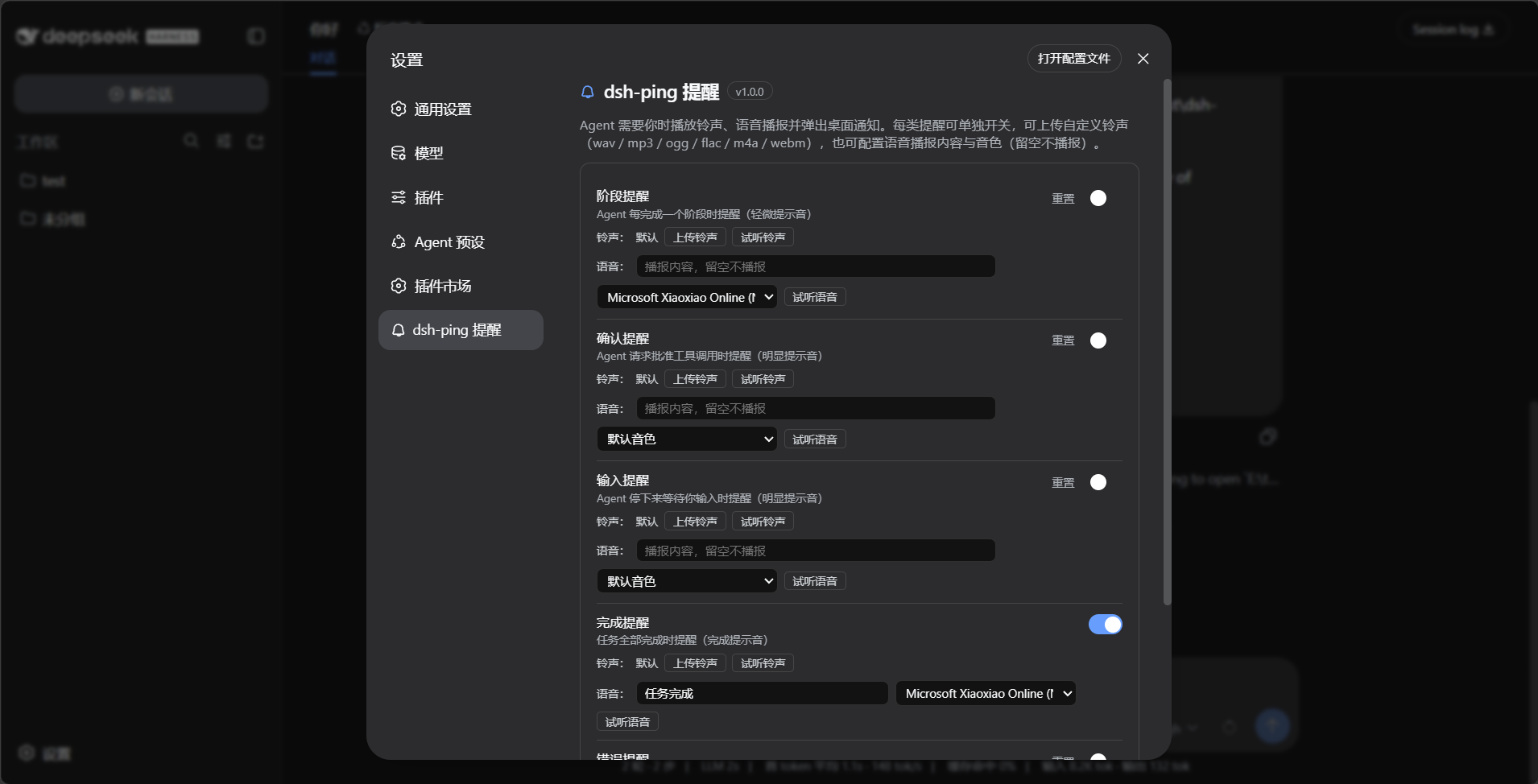
web profile 里设置面板中有独立的一栏「dsh-ping 提醒」:dsh web → 打开设置,侧边栏直接可见。
- 五个开关分别控制 stage / approval / input / complete / error 提醒,保存后立即生效,每项可单独"重置"
- 自定义铃声:每类提醒可上传自己的铃声(wav / mp3 / ogg / flac / m4a / webm),可试听、恢复默认
- 样式全部使用官方设计 token(
--dsw-alias-*),自动跟随系统深浅色主题
声音播放架构
| 场景 | 播放方式 |
|---|---|
| web 界面打开(含后台标签页) | 浏览器播放(HTML5 Audio,任意格式) |
| headless / 浏览器关闭 | host 兜底播放(PowerShell 等系统播放器,WAV) |
浏览器在线时,host 通过 SSE(/dsh-ping/events)推送提醒帧,浏览器从 /dsh-ping/sound/<type> 拉取当前铃声播放;桌面通知始终由 host 发出。上传的铃声存放在 $DSH_HOME/dsh-ping/sounds/。
实现分两半:
- Host 半(src/harness.ts):注册设置命名空间(
ctx.settings.register)、上传路由(POST /dsh-ping/upload)、SSE 事件流、声音文件路由 - 浏览器半(client.js):自包含客户端 bundle(
dsh.client),注册独立设置栏 + EventSource 播放器
事件映射(真实 API)
dsh-ping 通过 Cordis 监听 session/event 事件流(@deepseek-ai/dsh-session 的 SessionEventMap):
| dsh 事件 | dsh-ping |
|---|---|
step/end |
stage |
approval/asked |
approval |
turn/end(blocked) |
input |
turn/end(completed) |
complete |
turn/end(error) |
error |
防重复提醒:
step/end延迟 300ms 提醒;若 turn 紧接着结束,由 turn 级提醒(complete/input/error)接管- 同一 turn 已因 approval 提醒过,
blocked结束不再重复提醒
作为普通库使用
也可以不依赖 dsh,直接在任意 Node 项目里调用:
import { ping } from "dsh-ping";

await ping({
  type: "approval",
  title: "Agent 需要确认",
  message: "请回来确认下一步操作",
});

await ping({ type: "complete" }); // 标题和文案有默认值
CLI
dsh-ping test        测试声音 + 桌面通知
dsh-ping stage       轻微提示音(阶段完成)
dsh-ping approval    明显提示音(需要确认)
dsh-ping input       明显提示音(需要输入)
dsh-ping complete    完成提示音
dsh-ping error       错误提示音
本地开发时用 node bin/cli.js test,或 npm link 后直接用 dsh-ping。
提示音
声音文件在 sounds/ 目录,是脚本生成的简单正弦波 WAV,可以直接换成你自己喜欢的音频(保持文件名不变即可)。
重新生成:
npm run gen:sounds
实现说明
- 声音:零依赖。Windows 用 PowerShell
SoundPlayer,macOS 用afplay,Linux 用paplay - 通知:
node-notifier(唯一运行时依赖,Windows 下走 SnoreToast) - 插件入口:src/harness.ts 导出 Cordis 标准的
name+apply(ctx, config) - 测试:
DSH_PING_DRY_RUN=1 node scripts/verify-harness.mjs在真实 Cordis + dsh-session 上验证全部事件映射
License
MIT
评论
评论存放在 GitHub Discussions。用 GitHub 账号登录后可发表评论或点表情。