
安装
在 DeepSeek Harness 里通过 dsh-market 安装
dsh plugin --profile web add dshmarket
或使用命令行
dsh plugin --profile web add "https://github.com/GGBond2424648901/deep-whale-day-night-theme/releases/download/v0.1.12/deep-whale-day-night-theme-0.1.12.tgz"
装任何插件都等于在你的机器上跑第三方代码,权限和你本人一样大——能读你的文件、用你的凭据、访问网络。请先审阅源码,并尽量锁定 commit(github:owner/repo#sha)。
README
Non-commercial / 禁止商用: This project is released under CC BY-NC-SA 4.0. Personal and other non-commercial use is permitted with attribution; commercial use is prohibited, and adaptations must use the same license. 本项目采用 CC BY-NC-SA 4.0,允许保留署名的个人及其他非商业使用,禁止商业使用,衍生作品必须以相同许可证共享。
A complete day/night character UI skin for the DeepSeek Harness Web GUI. It replaces only the presentation layer: the native theme service switches the full scene, character, companion, controls, ornaments, and lightweight atmosphere without reading or changing sessions, model requests, or workspace data.
面向 DeepSeek Harness Web GUI 的完整鲸鱼娘昼夜主题。它只修改展示层:原生主题服务会同步切换场景、角色、侧栏宠物、控件、花边与轻量动态特效,不读取或更改会话、模型请求和工作区数据。
Screenshots · 主题截图
| Day · 白昼 | Night · 黑夜 |
|---|---|
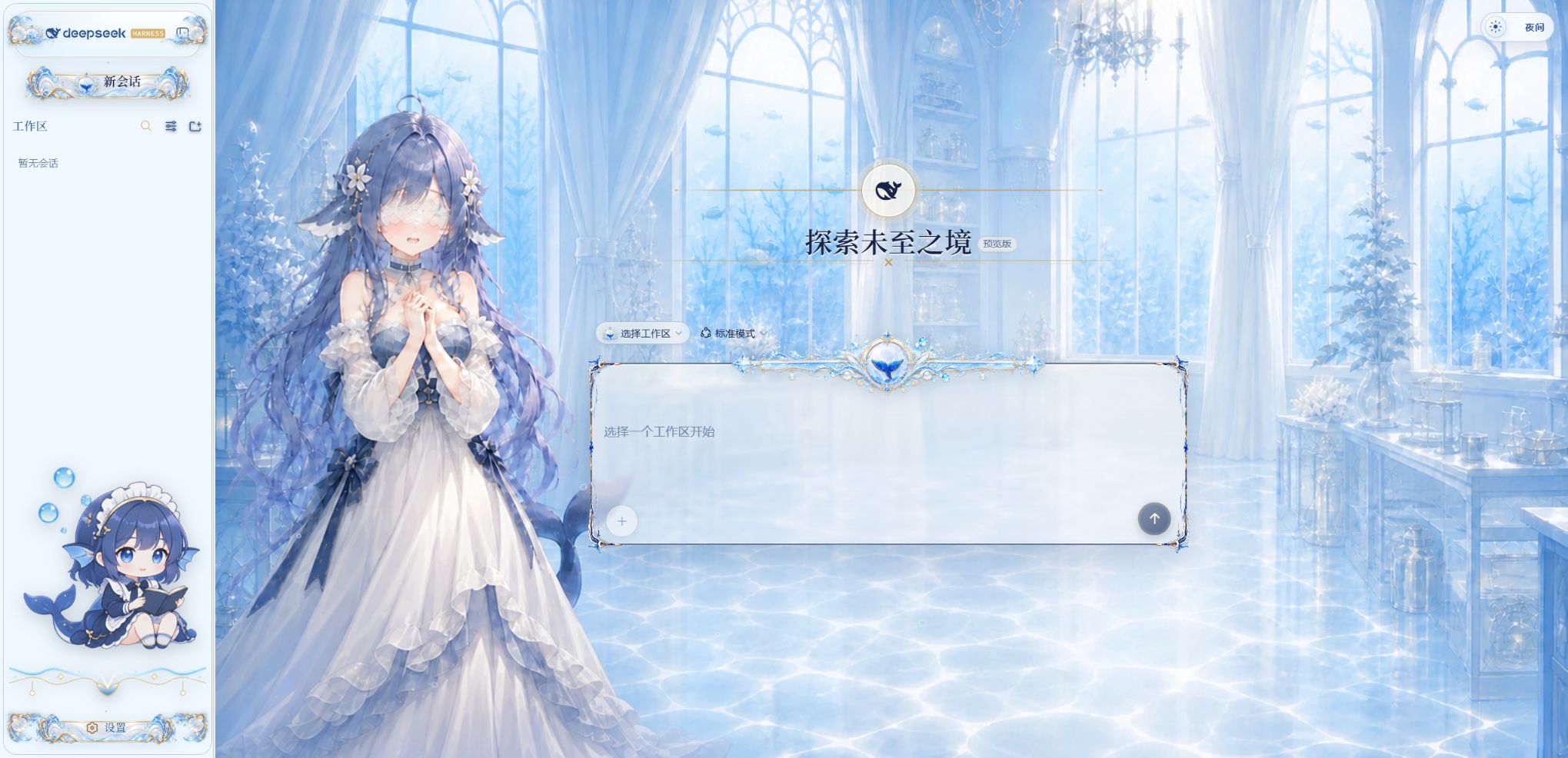 |
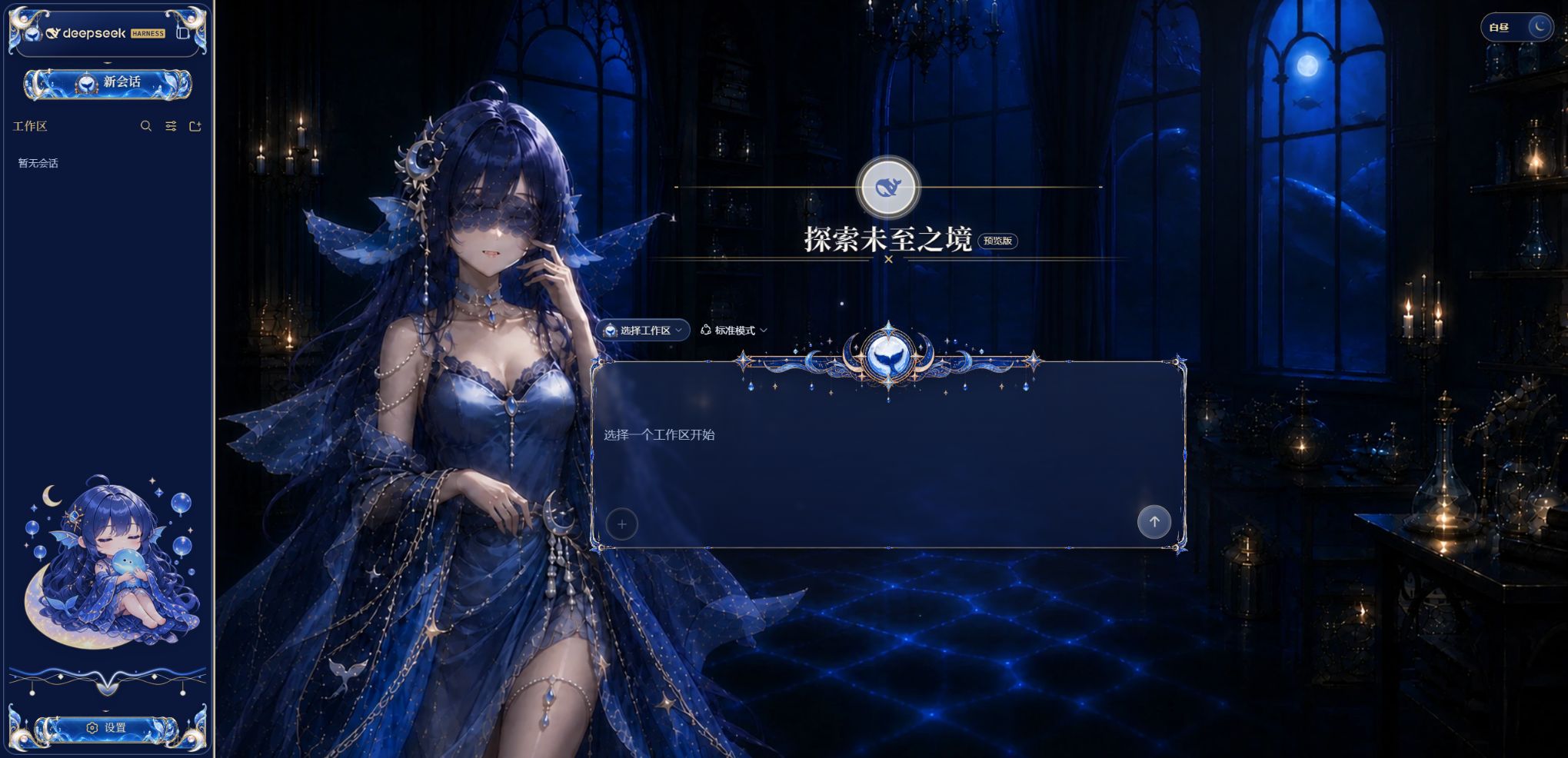 |
About · 关于
Deep Whale Day & Night is a complete non-commercial presentation skin for the official DeepSeek Harness Web GUI. It combines two coordinated interfaces rather than applying a simple color filter: a shy white-dress whale maid in a luminous crystal workshop by day, and a softly alluring blue-dress whale maid in a moonlit observatory by night. The native Harness theme button switches the scene, palette, translucent surfaces, composer crown, sidebar ornaments, chibi companion, title colors, and restrained ambience as one coherent set.
Deep Whale 昼夜主题是一套面向官方 DeepSeek Harness Web GUI 的完整非商业界面皮肤,并非简单换色。白昼是身着小白裙、神情羞涩楚楚的鲸鱼女仆与明亮水晶工坊;黑夜是柔和魅惑的蓝裙鲸鱼娘与月潮观测室。右上角 Harness 原生主题按钮会同步切换背景角色、整体色板、磨砂玻璃界面、输入框顶饰、侧栏花边、Q 版伙伴、标题颜色与克制的环境动效。
The skin is intentionally limited to the client presentation layer. It does not read or modify chat content, model requests, credentials, or workspace files. It uses the official @deepseek-ai/dsh-client-ui-theme service and an independent profile bundle entry, so it neither depends on a private theme catalog nor replaces Harness itself.
本主题严格限定在客户端展示层,不读取或修改对话内容、模型请求、凭据或工作区文件。它使用官方 @deepseek-ai/dsh-client-ui-theme 服务和独立 profile bundle 入口,不依赖私有主题目录,也不会替代 Harness 主程序。
v0.1.12 update · v0.1.12 更新
- Replaced the stale repository covers with authoritative captures reverified in a clean official Harness rc.7 profile. The published screenshots now show the current no-viewport-frame layout rather than the retired full-screen border artwork. / 使用官方 Harness rc.7 干净 profile 重新核验权威仓库封面;公开截图现在展示无整屏边框的当前布局,不再误用已废弃的全屏边框方案。
- Made runtime packaging rebuild the embedded client bundle before staging release files, preventing an older committed bundle from silently returning in a later release. / 运行时打包现在会先重新构建内嵌客户端 bundle,再暂存发行文件,防止后续版本意外回流旧编译包。
- Added the authoritative full day/night captures to the lightweight runtime and release package while retaining an uncompressed payload below 10 MiB. / 在保持解包内容不足 10 MiB 的前提下,将权威昼夜全图加入轻量 runtime 与 Release 安装包。
- Reconciled GitHub source, runtime branch, tag, release assets, checksums, and bilingual release notes as one tested release state. / 将 GitHub 源码、runtime 分支、tag、Release 文件、校验和与双语公告统一到同一个已验证发行状态。
v0.1.11 update · v0.1.11 更新
- Restored direct activation through the official Harness profile bundle and theme service; verified against
@deepseek-ai/dsh@0.1.0-rc.7. / 恢复通过 Harness 官方 profile bundle 与主题服务直接激活,并已针对@deepseek-ai/dsh@0.1.0-rc.7验证。 - Added a lightweight
runtimedistribution branch and release tarball. The install payload is under 10 MiB uncompressed instead of cloning the full artwork and development history. / 新增轻量runtime分支与 Release 安装包;无需克隆完整素材与开发历史,安装内容解包后不足 10 MiB。 - Reduced continuously animated particles from 24 to at most 10, removed full-screen idle animation loops and permanent compositor hints, and automatically enters reduced mode when the page is hidden, reduced motion is requested, or accelerated WebGL is unavailable. / 持续粒子由 24 个降至最多 10 个,移除全屏空闲循环与永久合成层提示;页面隐藏、系统要求减少动态或硬件加速 WebGL 不可用时会自动进入低动态模式。
- Removed dependencies on unavailable custom catalog services. Install, activation, removal, cleanup, and reinstall now follow the official Harness plugin lifecycle. / 移除对不存在的自定义主题目录服务的依赖;安装、激活、卸载、清理与重装均遵循官方 Harness 插件生命周期。
Features · 功能
- Complete crystal-workshop day scene and moon-tide observatory night scene with independent palettes, system title colors, character plates, and transparent chibi companions. / 完整的白昼水晶工坊与夜晚月潮观测室,分别使用独立色板、系统标题栏颜色、角色图和透明 Q 版侧栏宠物。
- Full component coverage for new sessions, workspace trees, session lists, chat cards, context injection, thinking rows, composer, model and permission menus, settings, tools, Todo, terminal, title bar, and collapsed sidebar. / 覆盖新建会话、工作区树、会话列表、聊天卡片、上下文注入、思考行、输入框、模型与权限菜单、设置、工具、Todo、终端、标题栏和折叠侧栏。
- Composer crown rails, sidebar ribbons, nine-slice component frames, and workspace ornaments retain their source proportions without adding a frame around the full viewport. / 输入框顶饰、侧栏飘带、组件九宫格边框和工作区装饰均保持源图比例,同时不再包围整个视口。
- The composer crown is separated from the content background; its outer tips align with the top border while the center emblem spans the rim without blocking native controls. / 输入框顶饰与内容背景分离,两侧尖角对齐顶部边框,中央徽章跨坐边线且不遮挡原生控件。
- Deterministic atmosphere with at most 10 staggered bubbles by day or drifting lights by night; hidden pages,
prefers-reduced-motion, and unavailable accelerated WebGL disable the loops. / 白昼最多 10 个错峰气泡,夜晚最多 10 个漂移光点;页面隐藏、prefers-reduced-motion或硬件加速 WebGL 不可用时会停用循环。 - All runtime artwork is embedded into the client bundle as data URIs, so the installed skin requires no remote asset service. / 所有运行时素材均以内嵌 data URI 进入客户端 bundle,安装后的主题不依赖远程素材服务。
Requirements · 使用条件
- DeepSeek Harness Web GUI. This release is tested with
@deepseek-ai/dsh@0.1.0-rc.7. dshorpnpm dlx @deepseek-ai/dsh@0.1.0-rc.7available for plugin installation.- Node.js and pnpm are required only when rebuilding or running tests from source.
Recommended lightweight install · 推荐轻量安装
Install the reviewed runtime-only branch from the public GitHub repository. It contains the prebuilt plugin, two preview covers, license, and documentation, but excludes editable source artwork and development dependencies.
从公开 GitHub 仓库安装经过审查的纯运行时分支。该分支只包含预构建插件、两张主题封面、许可和说明,不包含可编辑素材与开发依赖。
dsh plugin --profile web add git+https://github.com/GGBond2424648901/deep-whale-day-night-theme.git#runtime
Use the explicit git+https:// form shown above. pnpm may resolve the shorter github: form through SSH and fail with Permission denied (publickey) on machines without a GitHub SSH key. / 请使用上面的显式 git+https:// 地址。pnpm 可能把较短的 github: 写法解析为 SSH,未配置 GitHub SSH Key 的电脑会出现 Permission denied (publickey)。
If dsh is not globally installed:
pnpm dlx @deepseek-ai/dsh@0.1.0-rc.7 plugin --profile web add git+https://github.com/GGBond2424648901/deep-whale-day-night-theme.git#runtime
Install the Release package · 安装 Release 包
Download deep-whale-day-night-theme-0.1.12.tgz and SHA256SUMS.txt from the v0.1.12 release, verify SHA-256, then run from the download directory.
从 v0.1.12 Release 下载 deep-whale-day-night-theme-0.1.12.tgz 与 SHA256SUMS.txt,核对 SHA-256 后在下载目录执行:
dsh plugin --profile web add .\deep-whale-day-night-theme-0.1.12.tgz
Source and development channel · 源码与开发通道
git clone https://github.com/GGBond2424648901/deep-whale-day-night-theme.git
cd <harness>
dsh plugin --profile web add /absolute/path/to/deep-whale-day-night-theme
The default branch is the complete source and artwork channel for auditing, contribution, and rebuilding. The plugin activates directly when its profile row is loaded and restores every CSS, DOM, page-title, system-color, observer, timer, and animation change when unloaded. Its unique wiring ID is ui-skin-deep-whale-day-night.
默认分支是用于审查、贡献和重新构建的完整源码与素材通道。插件的 profile 配置行加载后会直接激活;卸载时会还原全部 CSS、DOM、页面标题、系统颜色、观察器、计时器与动画副作用。唯一 wiring ID 为 ui-skin-deep-whale-day-night。
To remove it:
dsh plugin --profile web remove @dsh-external/dsh-client-ui-skin-deep-whale-day-night
Update and migration · 更新与迁移
Existing installations using the current package name can update in place, then restart Harness:
已使用当前包名安装的用户可以原地更新,之后重启 Harness:
dsh plugin --profile web update @dsh-external/dsh-client-ui-skin-deep-whale-day-night
Versions published before the package rename used @dsh-external/dsh-client-ui-skin-maid-atelier. Remove that obsolete dependency first, then install the runtime branch with the current package name:
更早版本曾使用旧包名 @dsh-external/dsh-client-ui-skin-maid-atelier。请先移除旧依赖,再使用当前包名对应的 runtime 分支安装:
dsh plugin --profile web remove @dsh-external/dsh-client-ui-skin-maid-atelier
dsh plugin --profile web add git+https://github.com/GGBond2424648901/deep-whale-day-night-theme.git#runtime
To diagnose a profile, dump its composed configuration and confirm that ui-skin-deep-whale-day-night appears exactly once and no legacy ui-skin-maid-atelier row remains:
如需诊断 profile,请导出组合配置,确认 ui-skin-deep-whale-day-night 只出现一次,且不再包含旧的 ui-skin-maid-atelier 行:
dsh --profile web --dump-config
For deepseek-harness-desktop v2.0.0, install into the profile that the desktop launcher actually boots—normally web. If that distribution exposes and selects a separate desktop profile, repeat the same command with --profile desktop. Deep Whale uses only the public profile-bundle and browser theme interfaces; it does not require a desktop-private API.
对于 deepseek-harness-desktop v2.0.0,请把主题安装到桌面启动器实际启动的 profile(通常为 web)。若该发行版提供并选择了独立的 desktop profile,则把同一命令中的 --profile web 改为 --profile desktop 后再执行。Deep Whale 只使用公开的 profile bundle 与浏览器主题接口,不依赖桌面私有 API。
Day and Night Switching · 昼夜切换
Use the native top-right theme control. Day mode applies pearl white, ice blue, sapphire text, champagne-gold edges, rising bubbles, and the crystal scene. Night mode applies deep-sea blue, cobalt glass, moon-silver text, warm-gold edges, drifting stars, and the observatory scene. View Transition provides the circular reveal where supported, with a short fade fallback elsewhere.
使用右上角原生主题按钮切换。白昼模式采用珍珠白、冰蓝、蓝宝石文字、香槟金细边、上浮气泡和水晶场景;夜晚模式采用深海蓝、钴蓝玻璃、月银文字、暖金细边、漂移星点和观测室场景。支持 View Transition 时使用圆形揭幕,不支持时自动退化为短淡入。
Development · 开发
pnpm install
pnpm run embed:assets
pnpm run typecheck
pnpm run test
pnpm run build
assets/ contains editable scene, character, companion, composer, trim, and component artwork. The runtime defaults are the full-scale white-dress V3 day scene with a less-negative horizontal offset and the matched-height, left-safe V5 night scene with its restrained shy blush and reddish-pink lips; deep-whale-day-scene-v3.webp, deep-whale-night-scene-v3.webp, deep-whale-night-scene-v4.webp, and the earlier variants remain included as alternate source artwork. scripts/embed-deep-whale-art.mjs generates src/client/deep-whale-art.generated.ts; src/client/ornament-art.ts owns the non-distorting vector rails; and lib/ contains the committed prebuilt package.
assets/ 保存可编辑的场景、角色、宠物、输入框、花边与组件素材。scripts/embed-deep-whale-art.mjs 生成 src/client/deep-whale-art.generated.ts,src/client/ornament-art.ts 负责不变形的矢量长轨,lib/ 保存已提交的预编译包。
Repository Layout · 目录结构
assets/       Editable day/night artwork and generated UI slices
lib/          Prebuilt installable JavaScript
preview/      Compact light and dark previews
screenshots/  Full-page day and night captures
scripts/      Artwork embedding and build helpers
src/          TypeScript source and client skin
tests/        UI, asset, behavior, and distribution contracts
Compatibility · 兼容性
The skin targets the DeepSeek Harness Web GUI, is verified on @deepseek-ai/dsh@0.1.0-rc.7, and peers only with the official @deepseek-ai/cordis and @deepseek-ai/dsh-client-ui-theme packages. It keeps native controls, accessibility attributes, keyboard focus, menus, dialogs, command windows, and upstream auto-grow behavior; the skin is not a replacement for Harness itself.
本主题面向 DeepSeek Harness Web GUI,已在 @deepseek-ai/dsh@0.1.0-rc.7 验证,仅以官方 @deepseek-ai/cordis 和 @deepseek-ai/dsh-client-ui-theme 为 peer dependencies。它保留原生控件、无障碍属性、键盘焦点、菜单、对话框、命令窗口和上游自动增高行为,不包含 Harness 主程序。
Attribution and License · 署名与许可
This repository is distributed under Creative Commons Attribution-NonCommercial-ShareAlike 4.0 International. The controlling terms are in LICENSE; the complete three-stage creator and generation attribution chain is in NOTICE.
本仓库以 知识共享署名-非商业性使用-相同方式共享 4.0 国际许可协议发布。完整法律条款见 LICENSE,三阶段创作者与生成过程署名链见 NOTICE。
Original character creator: 上善 (Pixiv). Secondary DeepSeek maid redesign: zipzip (Pixiv). Theme adaptation and UI preparation: Small-tailqwq.
DeepSeek and related names or logos are the property of their respective owners. This fan-made non-commercial project does not imply official endorsement or affiliation.
评论
评论存放在 GitHub Discussions。用 GitHub 账号登录后可发表评论或点表情。