 Browse 10778 plugins
Install a plugin
GitHub
npm
中文
The plugin market
inside DeepSeek Harness
Browse and search 10778 community plugins, install with one click — most go live without even a restart. Updates, uninstall, live install progress. No telemetry, ever.
dsh plugin --profile web add dshmarketdsh web → Plugins → Plugin Market tab (dsh 0.2.1+; Settings → Plugin Market on older hosts). That's the whole setup.
This catalog is also a plugin market index. On dsh 0.2.1+, open Plugins → Discover → Index sources and add
https://cdn.jsdelivr.net/npm/dsh-plugin-catalog/index.json — the list as a format-1 index, served from npm so it loads quickly
everywhere (the GitHub Pages copies at awesome-dsh-plugin.com/index.json and dshmarket.com/index.json are the same document).
The Discover tab and the plugin_market agent tool then search the same plugins.
Most installed
Ranked by npm downloads over the last 30 days.
- ranxianglei/billion-context
The official billion-context plugin: a context-compression plugin for small context windows (a 100K context is enough), token savings (5x fewer tokens), and month-long single sessions (billions of tokens).
- helloHub1212/dsh-windows-mcp
Bridges the CursorTouch/Windows-MCP desktop automation server into DSH through the official MCP client bridge, registering its screenshot, UI tree snapshot, mouse and keyboard input, clipboard, process and registry tools as mcp__windows__* tools for the model, and adds a windows_mcp_doctor diagnostic tool. Computer Use is off by default and is switched on from the plugin panel.
- PC2005-cloud/dsh-pet#dsh-pet
Desktop pet for the DSH Web UI on Windows, macOS and Linux: 106 transparent animations in the browser overlay or a transparent always-on-top desktop window, throw-and-bounce drag physics with squash and particle scoring, a work-status bubble driven by live session events, self-talk and chat with persistent memory, balance display, meme-image bubbles, multiple pets on screen, and drop-in custom animations and pet packs.
- bowenliang123/dsh-context
DSH context insight panel: Context dashboard + /context command + Context browser — one-stop context lifecycle management with categorized composition, content details, evolution trends, compaction/injection events, and stats.
- MeteorNOX/DeepSeek-Balance-Whale-Widget
A fixed-corner whale widget for the DSH web GUI — balance, today's usage and per-turn cost with peak/off-peak pricing, editable balance-alert and daily-budget bubbles, a module-based custom bubble queue with A/B weighted choices and random lines or images, 30+ vendor templates (OpenAI, OpenRouter, Kimi, SiliconFlow, Ark, Zhipu, MiniMax and more) with per-model balance and subscription quota, plus task-end sound, imported audio, custom roles and a resource manager. Local-only, no telemetry.
- omdsh-dev/DSH-better-sidebar
Full sidebar workbench with file rendering and editing, terminal, Git, and subagents; third-party plugins can register new tabs.
- liustack/modlens
Vision bridge for text-only models: paste an image, get structured JSON evidence (OCR, layout, semantics).
- T-Auto/dsh-ops
Provides bash, PowerShell 7, and high-performance Rust tools for DSH on Windows to reduce token usage.
- kenryu42/cc-safety-net
Pre-execution guard that blocks destructive Git and filesystem commands and access to secrets such as SSH keys and .env files before a tool call runs.
- MichengAI/dsh-skills-manager
Manages local DeepSeek Harness skills in Settings and shows shared Agent skills as read-only.
- Han-1413141/dsh-cost-meter
Per-session and daily API cost, budget with usage %, official balance, history dashboard, and one-click official price sync with peak/off-peak pricing.
- zhu1090093659/dsh-web#packages/dsh-skill-explorer
Skill center for the dsh web GUI: browse all loaded skills grouped by source, enable or disable model invocation, create new skills, and delete into a recoverable trash.
- elysia395/dsh-wallpaper-engine
Requires DeepSeek Harness 0.1.5-rc.1+ (DSH Desktop >= 2.0.7) and dsh-better-sidebar >= 0.19.0 - update both before installing or updating this plugin. Plays local Wallpaper Engine Video/Web wallpapers behind the chat, renders Scene wallpapers as extracted static frames, and adds content-rating/type filters, custom uploads and an iOS-style liquid-glass settings window.
- zhu1090093659/dsh-pet
A whale-girl companion for the dsh web GUI: animations follow the agent state, with pat interactions and a feeding mechanic that raises intimacy from a calf to deep-sea bonds.
- xmanrui/dsh-im
Connect IM bots to DeepSeek Harness via QR codes or bot credentials (9 channels: Feishu, WeChat, DingTalk, WeCom, QQ, Slack, Telegram, Discord, and WhatsApp).
- vectorize-io/hindsight#coding-agents
Hindsight, agent memory that learns: long-term project memory with auto recall and retain, knowledge pages, deep reflection, and per-repo memory banks.
- flymysql/dsh-remote
Multi-machine remote workspace: manage many SSH hosts, pick a local or remote workspace in the native Add-workspace flow (system folder chooser / local path / remote dir browse), mirror a remote workspace to a real local folder, and operate it with rw_* tools. The picker is a centered modal that opens on the local tab and auto-fills `/` for remote paths, live-completing each directory level.
- zhu1090093659/dsh-web#packages/dsh-task-board
Task board for the dsh web GUI: a sidebar multi-column kanban whose cards run in real DSH agent sessions and can also be scheduled with cron expressions, executed host-side even with the browser closed.
- omdsh-dev/dsh-mnemon
Cross-agent, local-first persistent memory plugin for DeepSeek Harness (DSH), powered by Mnemon. It shares long-term memory across Mnemon-enabled agents and adds runtime memory, searchable project documents, semantic recall, knowledge graph, and a Sidebar UI.
- lhuans/dsh-genui
Renders OpenTiny GenUI charts, forms, calculators and mini apps inline in DSH replies via schemaJson fences, with user actions flowing back into the conversation.
- DDDMUC/dsh-free-search
Free, keyless web search for DSH: 7 engines (DuckDuckGo/Bing/SearXNG free + Exa/Perplexity/DeepSeek paid), auto-failover, settings-page UI with API key inputs and official links, web_fetch, and an engine test tool.
- MichengAI/dsh-archive-manager
Adds an archived-sessions page in Settings to search, restore, and delete archived DeepSeek Harness sessions by workspace.
- dingminhua/dsh-connect-workbuddy
Connects locally signed-in WorkBuddy models, CN and international alike, to DSH, reading each model's credit multiplier from the upstream catalog on every refresh, with per-model image input toggles, account switching backed by an auto-failing-over pool, manual daily check-in, and read-only credit overviews shown as compact pills on the card and in the composer.
- zhu1090093659/dsh-web#packages/dsh-ssh
SSH ops panel for DSH: web terminal, SFTP transfer with progress, local port forwarding, and one-command cluster execution across hosts; agents share the same host config.
- MYCF711/dsh-session-superagent
Session-level superagent: watch one GitHub repository and wake this session when an issue or pull request changes; requires a logged-in gh CLI, and the credential never reaches the model.
- zhu1090093659/dsh-web#packages/dsh-web-all
Plugin and skin collection for the DSH Web UI: task board, Git graph, right-side panel, remote mobile UI, pet, live token stats, and a skin center.
- zhu1090093659/dsh-web#packages/dsh-git-graph
Git branch selector and Git graph for the dsh web GUI: switch branches and explore branch-lane and commit history from the conversation header. Retired by the author in favour of the official workspace-changes plugin: the published npm package stays installable but is no longer developed.
- zhu1090093659/dsh-web#packages/dsh-remote-web-ui
Remote control of a dsh web workspace from phone or PC: QR-code pairing through a token-gated channel, SSE real-time sync, and separate mobile and full desktop GUI modes.
- Small-tailqwq/dsh-deep-whale#maid-atelier
Whale-girl skin series for the DSH Web UI (maid-atelier).
- mario841859784/dsh-onebot
QQ channel for dsh via OneBot 11 (NapCat and friends): reverse or forward WebSocket, DM and group chats, image and voice transcription, t2i text-image cards, merged forwards, and a settings page.
- WNLUO/dsh-mobile-plugin
Endpoint of a companion mobile app that also runs headless, with no desktop shell or Electron required: it serves a restricted mobile API over a relay tunnel or LAN pairing, for listing, opening and driving DSH sessions, following the live device event stream, and authenticating with revocable per-device credentials.
- MichengAI/dsh-codex-ui
Rebuilds the DeepSeek Harness web sidebar, workspace tree, search, and turn navigation in a Codex-style layout.
- yyh-001/dsh-meme
Chat meme stickers: text-only send, mood auto-send, QQ/WeChat-style picker, auto-learn, custom packs.
- shanliuling/dsh-image-gen
Native conversational image generation for DeepSeek Harness: ask the agent to create an image, and it handles generation and keeps the result directly in the conversation.
- c1overzz/dsh-bili-scroll
Let your DSH agent browse Bilibili on its own, read subtitles, write a daily digest, and @ you when it finds something worth your attention.
- liustack/modsearch
Web search bridge for text-only agents: ask the web or X, get structured JSON evidence (search, fetch, citations).
- ccch1mneyyy/dsh-TUI
Claude Code-style full-screen terminal UI: pixel-whale header, live status line, and streaming thought expansion.
- regrevia/dsh-unlag
The desktop app has its own refresh button. Edited a plugin but a run is still going? Refresh. Window sluggish after hours of use? Refresh. One button fixes both — running sessions, queued messages and drafts are untouched.
- ysr666/dsh-vision-router
Free vision for text-only agents: built-in keyless vision chain plus pixel tools (Q&A, grounding, crop, pixel diff, colors, OCR, SVG trace, cutout, screenshots); paste an image to use it.
- MichengAI/dsh-agency-agents
Adds a summonable domain-expert roster that runs as subagents while the parent session keeps the task and final answer.
- omdsh-dev/dsh-genui
Interactive UI components rendered inline in replies: layout, charts, forms, quizzes, mermaid, 3D scenes, and an action event loop back to the model.
- MichengAI/dsh-im-connect
Connects WeChat, WeCom, DingTalk, Feishu, Lark, QQ, and Telegram to a local DeepSeek Harness agent, with each IM chat as a separate workspace channel.
- dream-num/dsh-univer-office
Give DeepSeek Harness a real office environment. Univer Office Plugin brings spreadsheets, docs, slides, canvases, relational tables, and more into one runtime — with connected data, validation, versioned changes, and isolated worktrees for multi-agent collaboration.
- NanmiCoder/dsh-agent-teams
AgentTeams multi-agent teams.
- Scorp1o117/dsh-soul-md
Manage soul.md persona cards and long-term memory, with workspace and session persona selection and tools to read and update them.
- liguobao/ds-harness-remote
Multi-device remote access for DeepSeek Harness and supported coding workspaces through an end-to-end encrypted channel, with adaptive Relay/WebRTC transport, device authorization, workspace files, read-only previews, terminals, and optional Codex Remote.
- tt-a1i/archify#integrations/deepseek-harness
Generate validated, self-contained interactive architecture, workflow, sequence, data-flow, and lifecycle diagrams from repositories or system descriptions.
- Tencent/BrowserSkill#dsh-plugin-browserskill
BrowserSkill bridge for controlling visible Chrome and Edge Agent Windows from DeepSeek Harness, with native browser tools, accessibility and VOM observations, screenshots, owned multi-session control, and a live Web UI overlay.
See them running
Plugins that ship screenshots, most installed first.
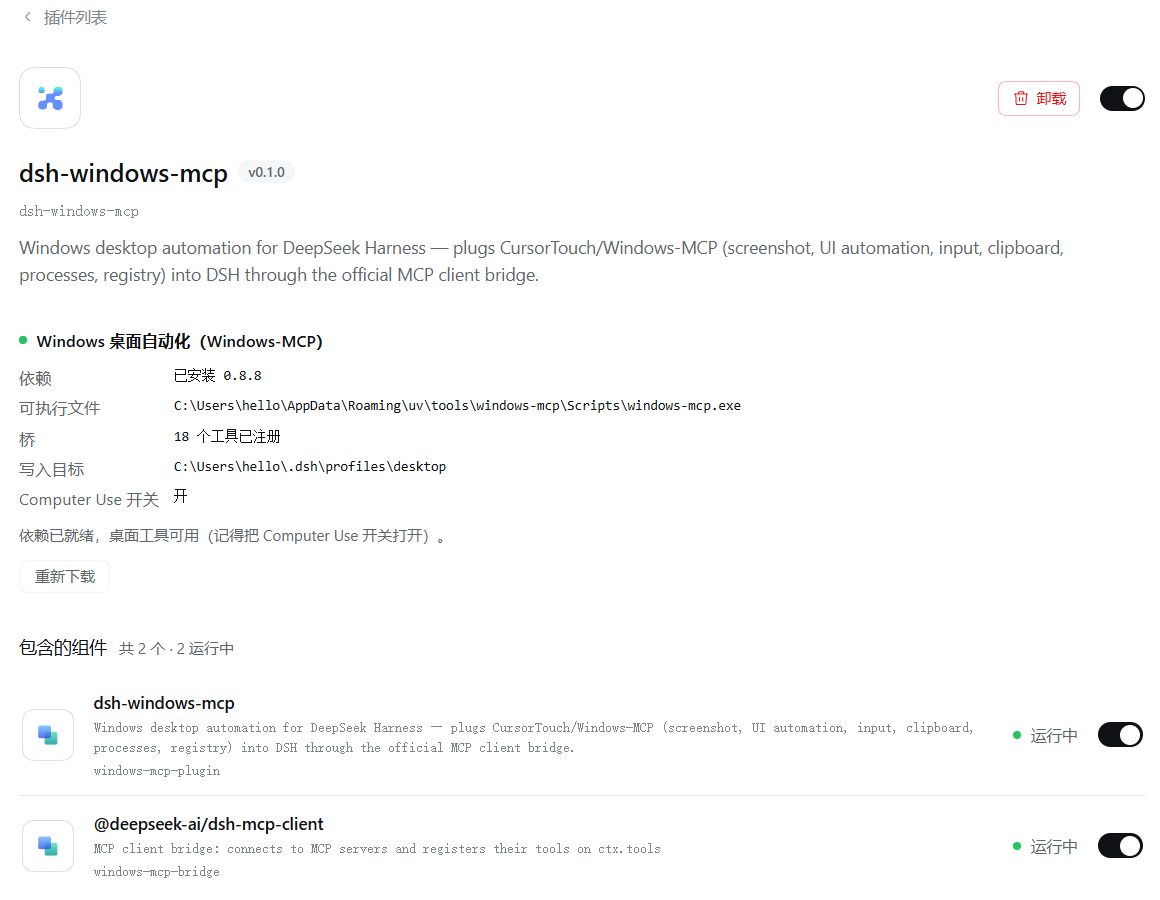 helloHub1212/dsh-windows-mcp
Bridges the CursorTouch/Windows-MCP desktop automation server into DSH through the official MCP client bridge, registering its screenshot, UI tree snapshot, mouse and keyboard input, clipboard, process and registry tools as mcp__windows__* tools for the model, and adds a windows_mcp_doctor diagnostic tool. Computer Use is off by default and is switched on from the plugin panel.
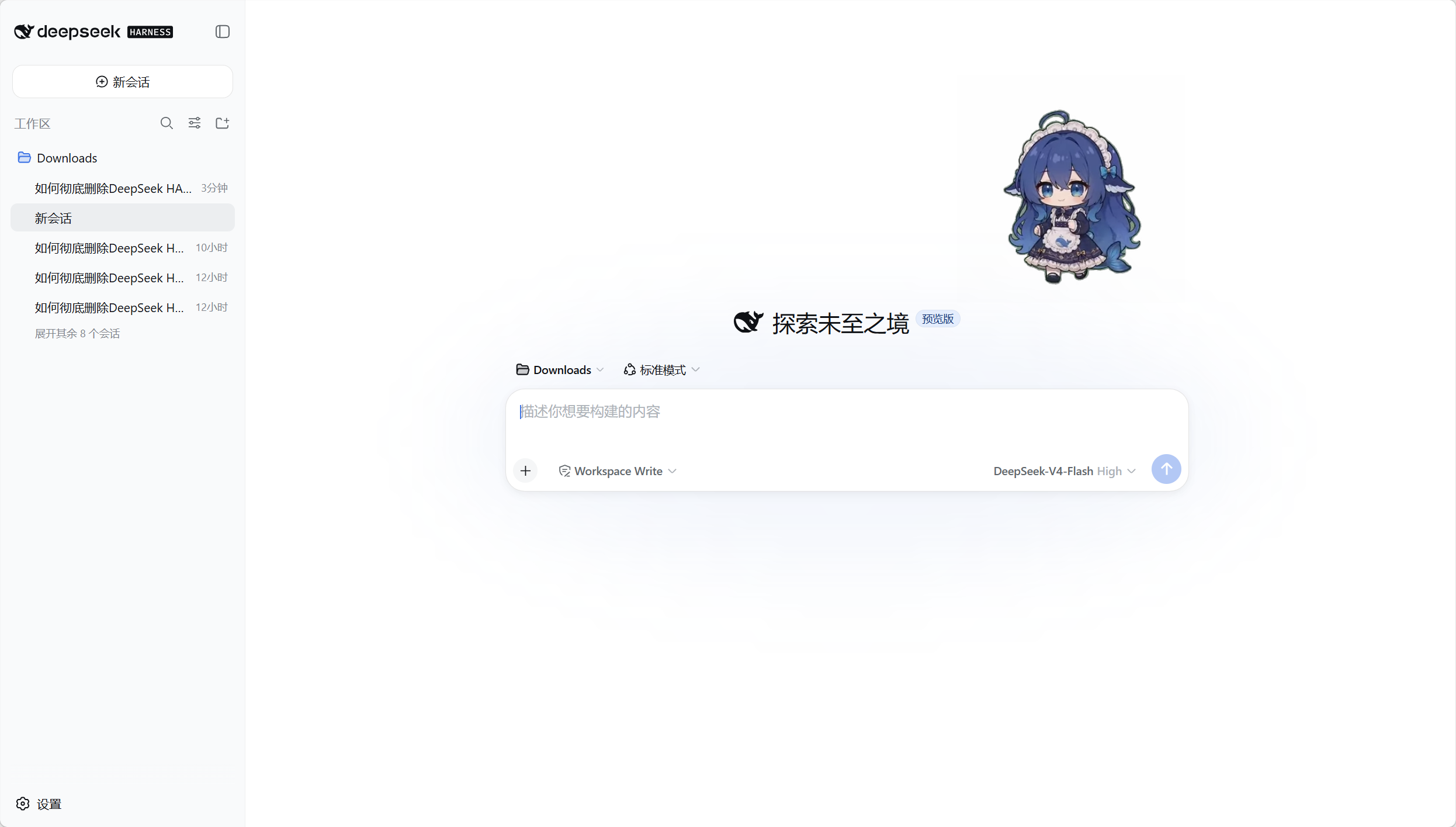 PC2005-cloud/dsh-pet#dsh-pet
Desktop pet for the DSH Web UI on Windows, macOS and Linux: 106 transparent animations in the browser overlay or a transparent always-on-top desktop window, throw-and-bounce drag physics with squash and particle scoring, a work-status bubble driven by live session events, self-talk and chat with persistent memory, balance display, meme-image bubbles, multiple pets on screen, and drop-in custom animations and pet packs.
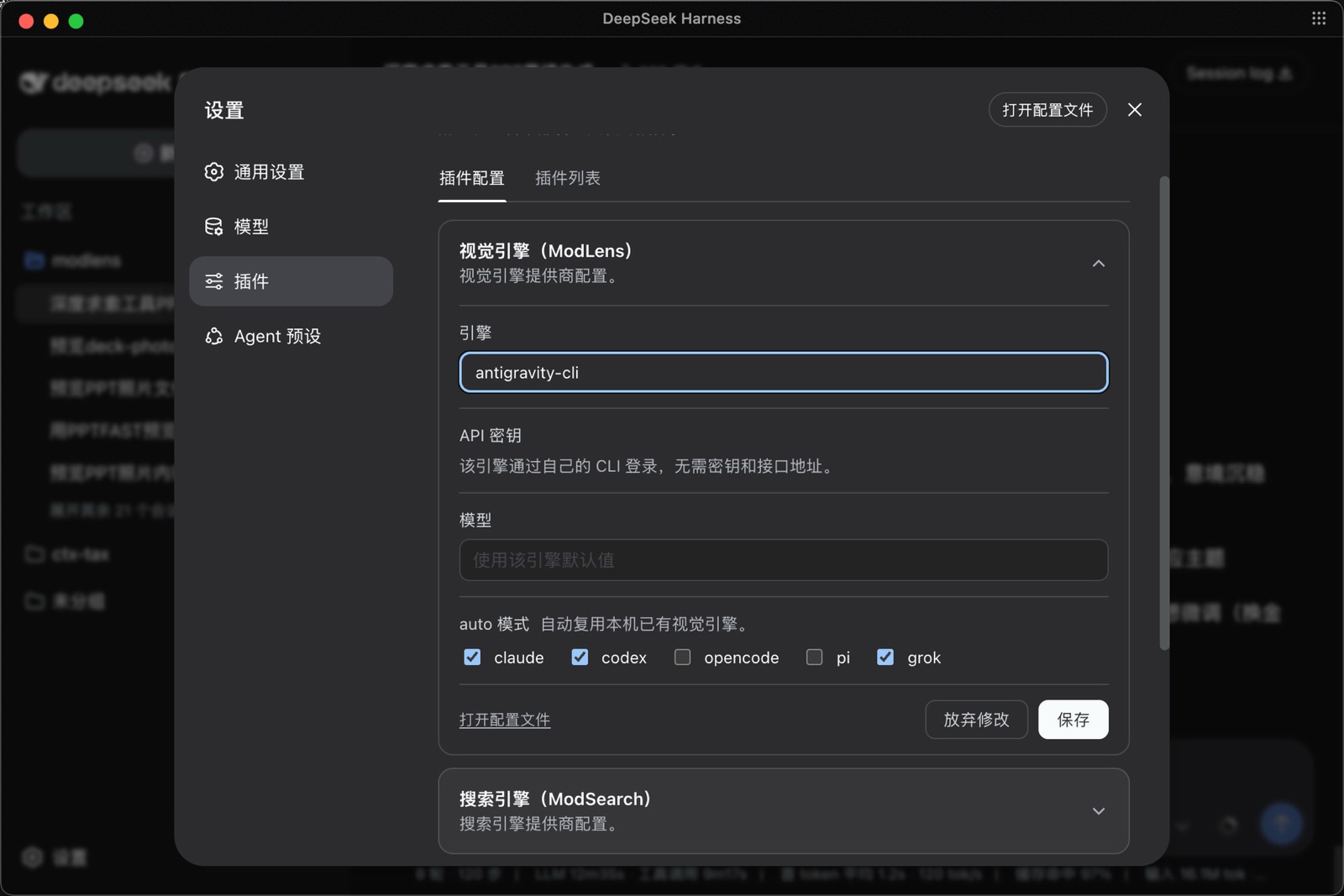 liustack/modlens
Vision bridge for text-only models: paste an image, get structured JSON evidence (OCR, layout, semantics).
 Han-1413141/dsh-cost-meter
Per-session and daily API cost, budget with usage %, official balance, history dashboard, and one-click official price sync with peak/off-peak pricing.
 elysia395/dsh-wallpaper-engine
Requires DeepSeek Harness 0.1.5-rc.1+ (DSH Desktop >= 2.0.7) and dsh-better-sidebar >= 0.19.0 - update both before installing or updating this plugin. Plays local Wallpaper Engine Video/Web wallpapers behind the chat, renders Scene wallpapers as extracted static frames, and adds content-rating/type filters, custom uploads and an iOS-style liquid-glass settings window.
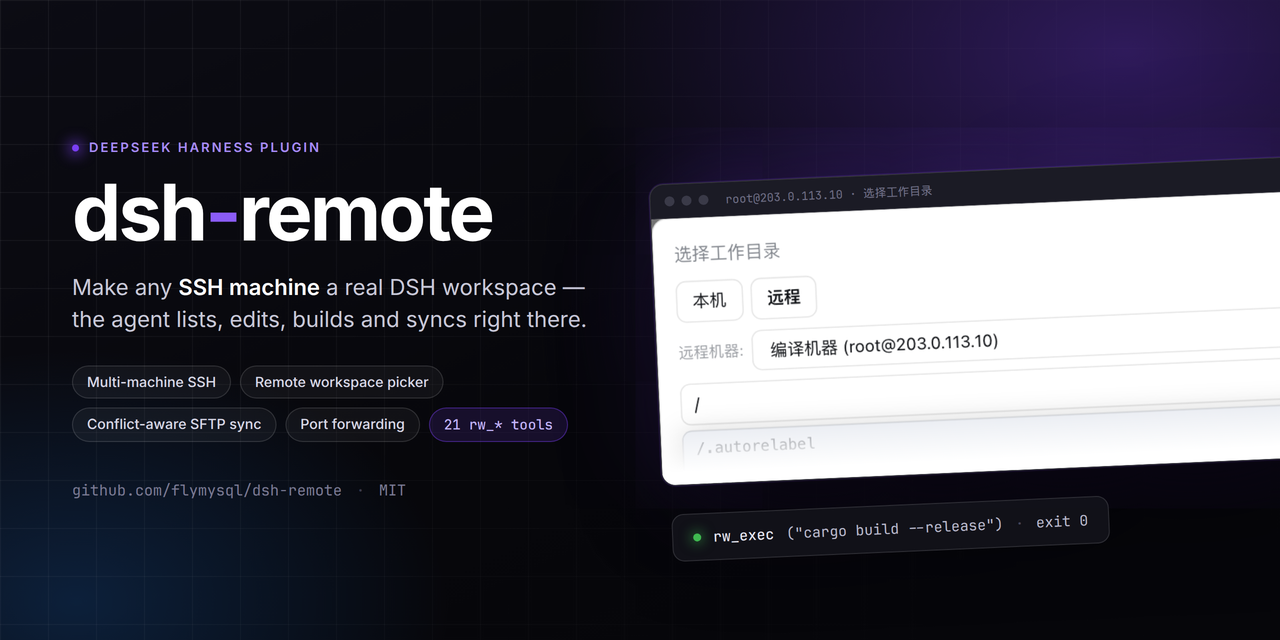 flymysql/dsh-remote
Multi-machine remote workspace: manage many SSH hosts, pick a local or remote workspace in the native Add-workspace flow (system folder chooser / local path / remote dir browse), mirror a remote workspace to a real local folder, and operate it with rw_* tools. The picker is a centered modal that opens on the local tab and auto-fills `/` for remote paths, live-completing each directory level.
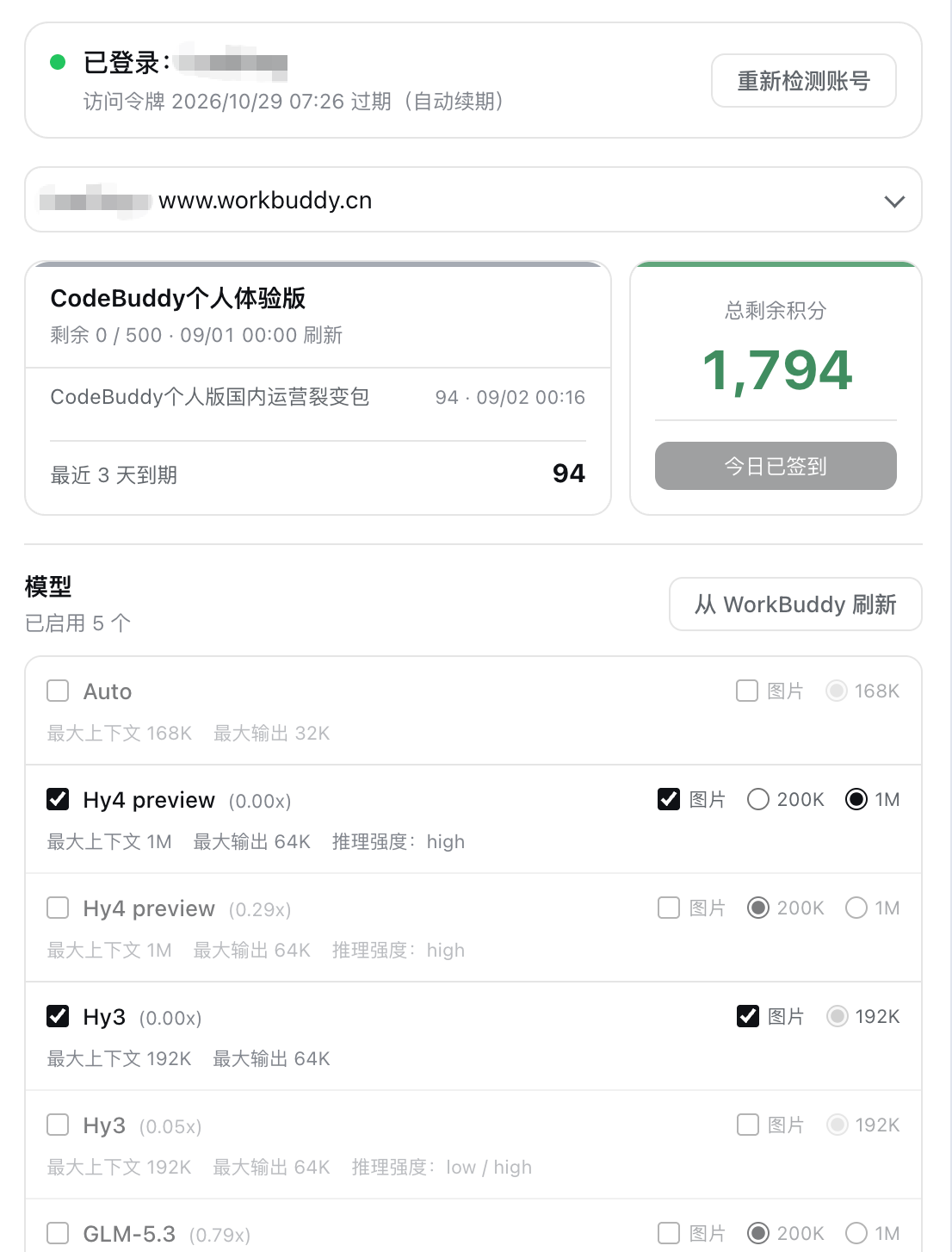 dingminhua/dsh-connect-workbuddy
Connects locally signed-in WorkBuddy models, CN and international alike, to DSH, reading each model's credit multiplier from the upstream catalog on every refresh, with per-model image input toggles, account switching backed by an auto-failing-over pool, manual daily check-in, and read-only credit overviews shown as compact pills on the card and in the composer.
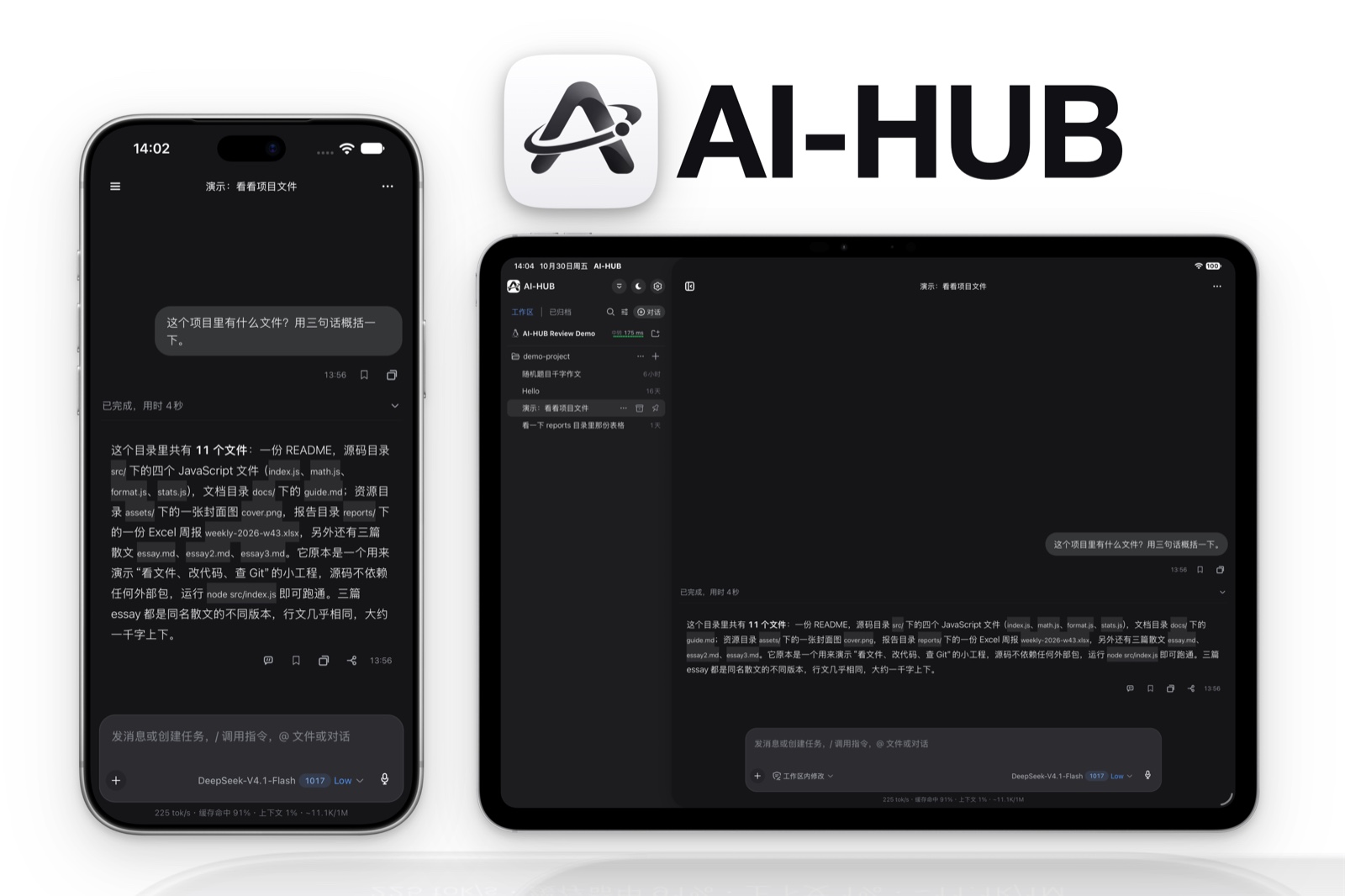 WNLUO/dsh-mobile-plugin
Endpoint of a companion mobile app that also runs headless, with no desktop shell or Electron required: it serves a restricted mobile API over a relay tunnel or LAN pairing, for listing, opening and driving DSH sessions, following the live device event stream, and authenticating with revocable per-device credentials.
 yyh-001/dsh-meme
Chat meme stickers: text-only send, mood auto-send, QQ/WeChat-style picker, auto-learn, custom packs.
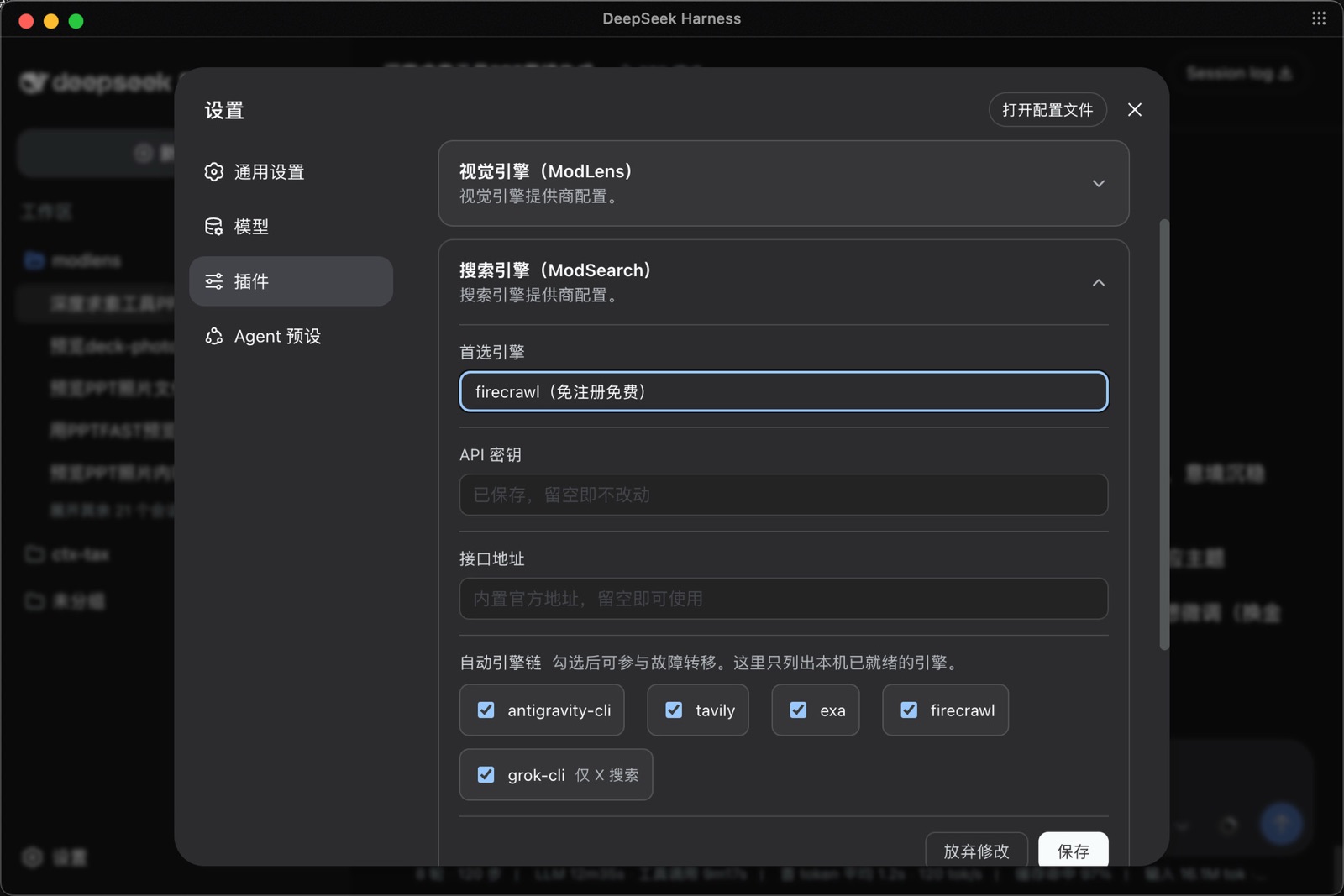 liustack/modsearch
Web search bridge for text-only agents: ask the web or X, get structured JSON evidence (search, fetch, citations).
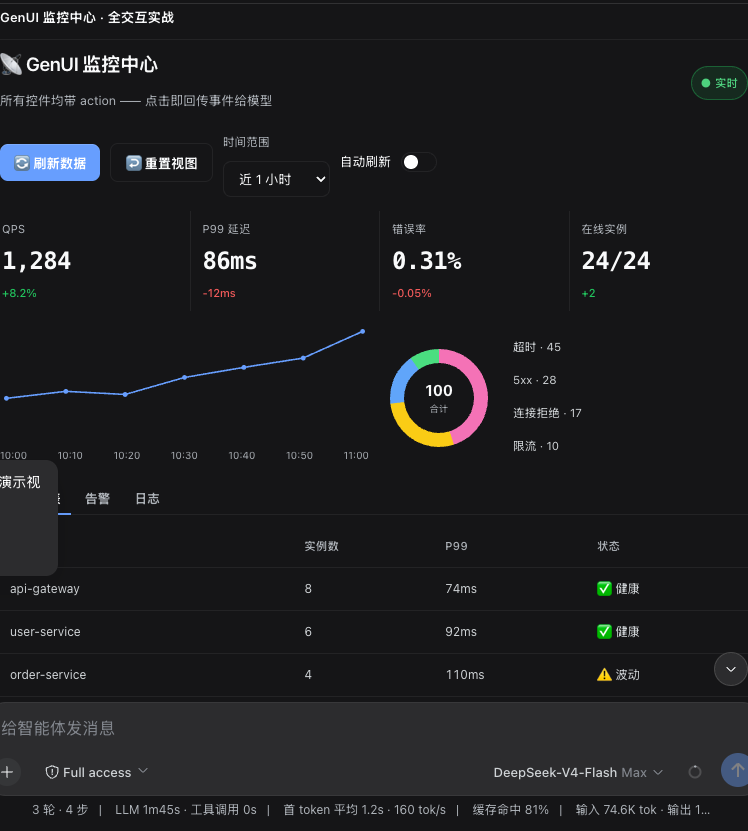 omdsh-dev/dsh-genui
Interactive UI components rendered inline in replies: layout, charts, forms, quizzes, mermaid, 3D scenes, and an action event loop back to the model.
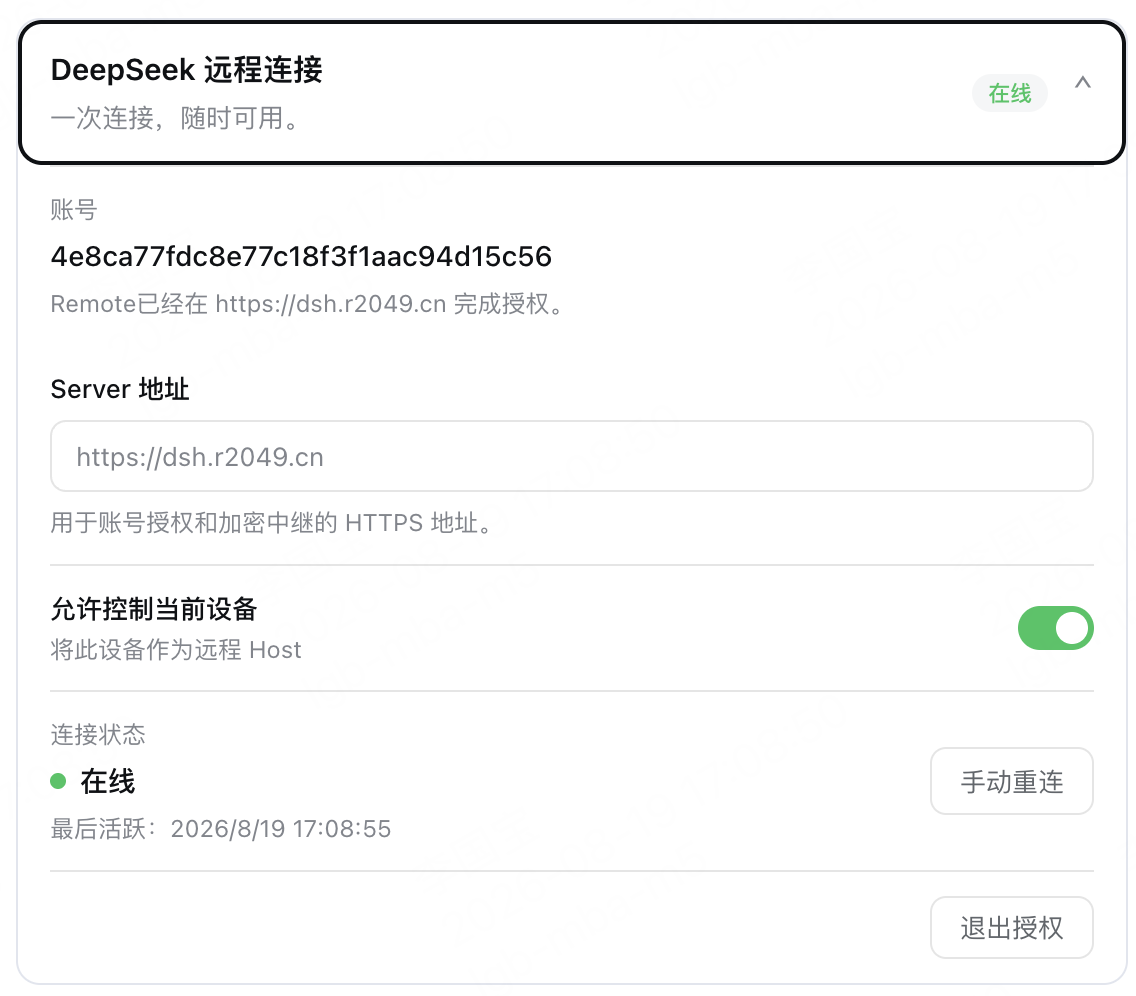 liguobao/ds-harness-remote
Multi-device remote access for DeepSeek Harness and supported coding workspaces through an end-to-end encrypted channel, with adaptive Relay/WebRTC transport, device authorization, workspace files, read-only previews, terminals, and optional Codex Remote.
Newly listed
The latest additions to the catalog.
- YingshuoZhang/dsh-chinese-reasoning
Makes a DeepSeek Harness agent reason in Simplified Chinese: each turn it appends one runtime-context instruction at the end of the conversation, and it can keep a stable declaration in the system prompt as well. Settings pick Simplified Chinese or off, and whether that declaration is included.
- 1499501762/dsh-sidebar-manager
Sidebar and conversation top-bar menu editor for DSH web: reorder, group, hide and re-icon entries (drag and drop, group flyouts, custom SVG or uploaded icons), reserves a configurable minimum height for the workspace tree, and exposes window.__dshSidebarManager for agents.
- 2750599332-art/dsh-inkwell
Composer-toolbar button that rewrites the draft prompt into a clearer, more complete version through the Harness LLM route, with a revert control that restores the pre-enhancement text; a settings page holds style keywords and an independent model choice.
- 3341284397-max/dsh-question-bubbles
Surfaces the questions a model almost asks but never voices — bubbles above the whale widget pick them up from the reasoning stream in real time, and you can answer one in place so it is folded into the next step without interrupting the run. Supports a prompt-marker protocol that lets the model mark its own doubts, five languages, DSH light and dark themes, and depends on dsh-whale-widget for placement.
- 5777-wq/dsh-openfin
Native DeepSeek Harness surfaces for markets and finance: a full page with 11 live quotes (SSE, SZSE, ChiNext, Hang Seng, Nasdaq, S&P 500, Dow, COMEX gold, dollar index, BTC, ETH) and sparklines, a market-cap heatmap of up to 96 A-share industry boards with a constituent drawer, movers, an eastmoney news feed, 25 plain-language articles and a 293-term glossary; the complete OpenFinLens terminal (MIT, vendored, served by the Host) embedded as the default tab; and a floating quote card with a searchable instrument picker and a boss key that also hides the optional always-on-top desktop window. The Host fetches upstream server-side with a 30 s snapshot cache, per-part timeouts and stale fallback: no API key, no browser CORS workaround.
- 627666/dsh-sidebar-compact-macos
For the macOS desktop app - keeps the DeepSeek Harness brand mark in the title-bar strip, puts New session, Plugins, Scheduled tasks and More on one row of four equal buttons, and tightens the workspace list so more conversations fit; browser and Windows layouts are untouched.
- 7Andrew-Chu/dsh-todolist
Floating glass to-do card for the Harness Web UI with drag placement, resize, hide/show, four status views and an Eisenhower four-quadrant mode.
- 879745uhjun/dsh-approval-zh
Translates the English text of DSH approval prompts and ask_user_question cards into Chinese for display only: approval outcomes, option labels, tool names and JSON arguments stay unchanged, and approval audit records keep the original English. The text is sent to Microsoft's Edge translation endpoint (edge.microsoft.com) to be translated, so the content of approval prompts and questions, including command text, leaves your machine.
- 879745uhjun/dsh-notepad
Adds a notepad to the DSH Web UI that floats as an edge-snapping, resizable card or docks into the real bottom layout row, switchable at runtime with shared text and images; notes auto-save (text in localStorage, images in IndexedDB) and follow the active theme.
- AstralHorizon4/dsh-shared-reading
Read books inside DSH: import EPUB, TXT, Markdown or HTML into a paginated reader, highlight a passage and ask about it in that book's own agent session; four reading tools stop at unread chapters and everything stays in plain local files. Its routes are mounted with webServer.register and carry no DSH Host/Origin admission check, so a web page open in your browser can create reading sessions and change the library through them.
- beyondgjc/dsh-persona-presets
Three custom agent presets, one editable character card each, with three built-in personas out of the box; import SillyTavern character-card PNGs or md/txt/json setting files, and the settings section handles naming, editing, and card-image display — edits apply on the next turn with no restart.
- Blacstar7/dsh-fps-workbench
Four-pointed star (FPS) adds a session output panel, tool summaries, attachment draft recovery, and provider usage to DSH.
- charce526/dsh-logo-swap
Customize DeepSeek Harness branding — swap the sidebar and hero logos, rebuild the DeepSeek and Harness wordmark halves, edit the welcome headline, and toggle the preview badge.
- ChenYichener/dsh-nce
New Concept English Book 1 study panel: 144 lessons with text, IPA vocabulary, grammar and a Bilibili video on one page, Anki-style spaced repetition, a mistake notebook, and fillable exercise papers graded by your own model.
- dlgrv/dsh-remove-deepseek-logo
Removes the DeepSeek Harness logo, brand name, version string, and the conversation hero fish from the sidebar.
- Domush/dsh-plugin-message-history
Shell-style Up/Down arrow key message history navigation for DSH Web UI with cross-session persistence and draft restoration. It keeps up to 100 of your past messages as plain text in ~/.dsh/message-history.json, filling it at startup from the session records already under ~/.dsh/sessions, and makes no network requests.
- echoVic/dsh-workspace-ide
A VS Code-like workspace panel with a JetBrains-inspired editor: lazy file tree, TypeScript code viewer with syntax highlighting, soft-wrap, find & replace, Quick Open, multi-tab drafts, bracket matching/auto-pair, workspace-wide text search, git status/history with coloured diffs, six VS Code palettes plus follow-DSH, Markdown and image/SVG previews. Nine authenticated host routes serve the filesystem, images, git reads and a quick-open file index.
- GT-610/dsh-workspace-organize
Grouped workspace browser for the DSH sidebar: named groups over group > workspace > session, group-level archive and delete that show the affected count, a three-way archived-session filter, and a group document the Host half writes to $DSH_HOME/storages. Drawn with the shell's own --dsw-* tokens and official components, so rows, menus and theme switching match the native sidebar.
- guyue55/dsh-disk-panel
Left sidebar disk panel for the DSH Web UI: volume free space, per-Workspace folder sizes, moving build artifacts to the macOS Trash with an audit log and restore, sending scan results to an agent, and a host-side low-space watchdog with OS notifications. macOS and Linux only; Trash cleanup works on macOS only, while Linux gets the scan, trend and watchdog without cleanup. Cleanup is limited to a fixed list of build-artifact folder names directly under a registered Workspace.
- hua-1111/dsh-logos-forge
Prompt forge for DeepSeek Harness: one draft becomes three parallel rewrites, read for intent first and scored blind by the model, with the sentences each version added highlighted — then bind one back into the composer.
- iswalterwu/agent-site#dsh-plugin
Opens a separately downloaded Windows desktop pixel monitor for pi, Claude Code and DSH sessions. DSH monitoring is read-only.
- ityyq777/dsh-workbench#host
Shared runtime for the Personal Workbench: local SQLite, domain registration, agent tool, HTTP/SSE and opt-in cloud sync for the Tasks, Tags, Sites and Storage plugins.
- jackdu2333/dsh-hermes-workspace
A DSH sidebar panel that talks to locally running Hermes TUI gateways over JSON-RPC: switch between bot profiles, resume their Bot Chat sessions, stream message and tool deltas, and embed the Hermes terminal view.
- JavaArthur/dsh-home
A personal home workspace with tasks, a focus timer, a Flomo notes timeline, shortcuts and wallpapers.
Guides
How the market and DSH behave, and what to do when something looks wrong. Each guide answers one question.
- Why an update says "waiting": the release-age wait
A new plugin version is held for a set time before DSH will install it. What the wait is, why it exists, how dsh web and the desktop app differ, and how to change it.
- "Installed, not in effect": what each plugin state means
Every status the Installed tab can show — in effect, restart needed, incompatible, library, failed — what it means and what to do about it.
- What the permission labels on a plugin mean
Plugin pages list what the code appears to do: read files, use the network, run commands. Each label in plain terms, and what a static scan can and cannot tell you.
- Desktop app or dsh web: where your plugins live
The desktop app and dsh web each keep their own plugin list. How to install in each, and why a plugin you installed may seem to be missing.
- "The plugin market stopped running": what happened and what to do
Why the market page can report that it stopped after an install or update, what to try in order, and what happened to the operation you were running.
- The DSH plugin ecosystem in numbers
How many DSH plugins exist, how fast the catalog grows, which categories dominate, how concentrated installs are, and what plugins ask to do. Computed from the catalog on every rebuild.
- We installed the most downloaded DSH plugins
A clean DSH, the market's own install button, the most downloaded plugins. Which ones worked straight away, which needed a restart or your approval, and which need a newer DSH.
What dsh-market is
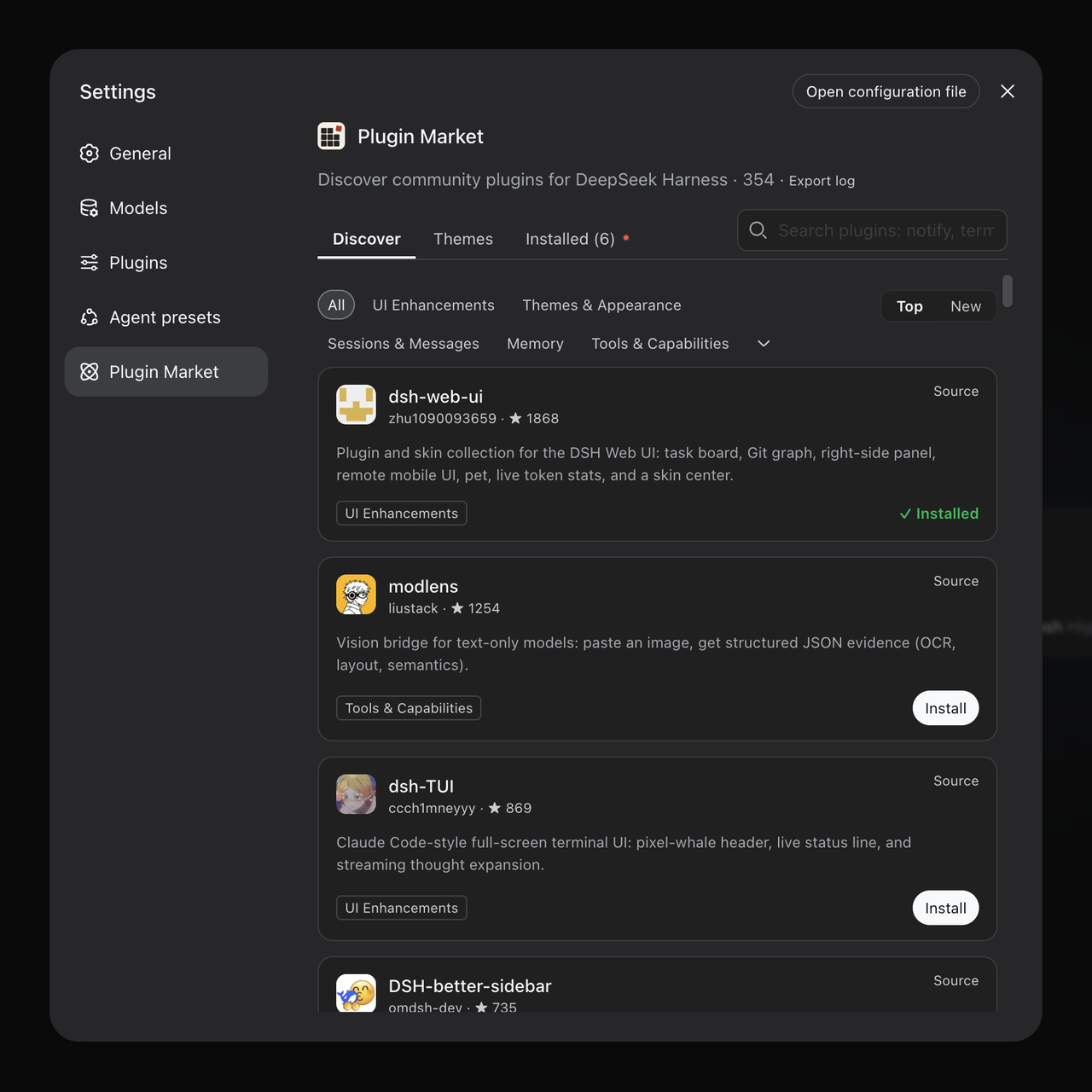
Everything, in one place
The full curated catalog from awesome-dsh-plugin — categories, star counts, top/new sorting, bilingual descriptions.
Fast installs
npm tarballs are preferred over full-repo GitHub downloads whenever a plugin publishes to npm — typically seconds.
No restart, mostly
Most plugins are live right after a page refresh. Updates and uninstalls take one click too — the market even updates itself.
Zero jargon
Missing a component? The market detects it and fixes it with one button. You never see a terminal.
Guard rails
Installs are restricted to the curated registry, build scripts stay blocked by default, and terminal-surface plugins are flagged before you install them.
Private by default
The market never phones home. Even the bug-report log export is sanitized and stays on your machine until you share it.
Common questions
What is a plugin?
An extension that adds something to dsh: a different interface, another model, a new tool, access from your phone. Uninstall it any time.
How do I install one?
Install this market first (the command above), then press Install in the market. To install from a terminal, or when an install fails, see the install guide.
Does it cost anything?
The market and the list are free and open source (MIT). Plugins are published by their authors; check each plugin's own page for whether it charges.
Do I need to restart dsh?
Most plugins are live after a page reload; a few need one restart of dsh web. If the plugin shows up under Settings → Plugins, it installed.